Showing posts with label duplicate. Show all posts

Tuesday, September 11, 2012

Zhadowsee's Birthday Stables

Yes, I'm still around. Life just caught up with me (I took a trip out to visit Z, and coming home has been an adjustment. Then migraines and other facets of life hit, and gaming took a backburner to everything else). But I'm here now.

Just in time for Zhadowsee's birthday, in fact.

I bought Zhadowsee a mount for his birthday. Meet Compass, the drake. However, it seemed a little cheap of me just to get Z a mount for his birthday. Your birthday is only once a year, and unlike the grandfather clock and sweet note he gave me, I couldn't be sure that he'd like the drake. After all, I'd raved about how much I adore grandfather clocks, and built several in-game before they came out with the station cash one. Plus, the station cash one has a dragon on it! Anyone who's spent a bit of time with me knows that I'm dragon crazy.

Then I decided that I would build him some stables to go with the mount. I've never actually decorated a full house for Z. I've done rooms, partial homes, partially completed homes, but I've never finished anything for him. Part of it is that he likes to decorate on his own. Part of it is that out of the two of us, he's the storyteller. Decorating is telling stories with scenery, but it's a very slow method of storytelling, and I'm better at vingettes than telling a full story. His decorating is more organic--he once did an RP scene for me, in which objects in the house kept moving. He had several layouts, plus what he moved by hand. Depending on what I noticed, what happened next changed. So I've never done a house for him, leaving him to set them up himself.

The first thing I did was to sneak onto his account. Unlike me, Z doesn't have a ton of empty houses waiting for use. He had exactly three houses, and all three of them are already in use.

Well, that was no good for my purposes. I immediately tabbed back to Jazabelle and started touring prestige houses. I knew I wanted the house to be a prestige house, for the portals. The stable was going to connect to his home in Neriak, whether he wanted it to or not!

It was as I was browsing houses that I realized that the Secluded Sanctum has an item count of 800, and costs only 1000 SC! All other 800 item count houses cost 1350 or so. Plus the Secluded Sanctum has a very wide open front room, which was perfect for my purposes.

I added the Secluded Sanctum to Zhadowsee's gift, tabbed back to Zhadowsee, and claimed the house. Then I snagged the mount out of the mail, dumped it in the house, and set Jazabelle trustee. Carefully, I positioned Zhadowsee exactly back where I found him, and logged him out.

Then I feverishly set to work.

The front doors, minus the door frames. Those came later.
I had seven hours to complete the house, not counting the time off I would have to take for food and housework, if I wanted to finish it up before Zhadowsee got home and logged on.

The first step was to build the walls of the stable. The Secluded Sanctum is rotated 22.5 degrees off of the cardinal directions, so I had to figure out how I was going to cover the existing ground in the Sanctum, while keeping to the shape of the stables that I wanted. Luckily, it wasn't too hard. The center pathway of the Sanctum is 12 units wide--exactly the width I wanted the stable's main hallway to be. And with the rotate group around point tool, it was a simple matter to build the stable on a straight East/West axis, then rotate everything around the first tile to line it up to the house. With that figured out, I really got down to business.

Unfortunately, I didn't reach my self-imposed goal of finishing before Zhadowsee got home.


I gave him some very firm instructions. I'd done my best to ensure that he wouldn't be able to find the house, except that I'd gone ahead and dropped a portal into his Neriak house, so that I wouldn't have to do it later. He was very good about not sneaking into the work in progress.
The final view of the stable doors.

Happily, he had plans away from the keyboard (I know you're not supposed to say that about your significant other, but sometimes you just need that privacy to get things done! I didn't want to feel like I was ignoring him in order to finish up his present, so the fact that he had things to do was perfect). So, given another couple of hours to get things done, I went to work even harder!

Originally, I'd set up the stable with 8 stalls. I had five mounts on me that I wouldn't mind missing or were easy to replace (The Gorowyn, Neriak, and Kelethin destriers, the quested Gryphon from DoV, and the Winter Wolf mount). That left two empty stalls--stalls which Zhadowsee could put any of his own spare mounts into.

View from the front of the stable.
I divided the stalls up into meat eaters on one side, grain eaters on the other. Yes, normally that would be a bad idea. Having the poor horses face predators would probably stress the animals unduly. However, this is a fantasy game, and horses stand around calmly next to predators all the time. (I really do put that much thought into layout and position.)

The stable itself was very easy to build, once I'd decided on how I wanted to do it. The stall doors are taller than I'd like, but we don't have any half dividers. If we ever do get half dividers, I'll switch them out and make things a bit more realistic in there. As it is, Zhadowsee's stable has really tall walls.

I built one stall, then duplicated it three times. I'd made sure that the stall was 7.5 units long, so it was a simple matter of moving each new stall 7.5 units further down the line than the stall before it.

Then I took everything I'd made so far, and I mirrored it around the E/W axis. That gave me all eight stalls with minimal work.

Zhadowsee meeting Compass. I'm not sure they like each other.
Unlike my usual method of construction, where I build the structure first, then go through and add in major structural details, then go through for minor structural details, and finally end with putting in decorative details, I built this stable in phases.

I could have allowed Zhadowsee to peek the minute he got home. The structure was up, the mounts were in their stalls, and it looked vaguely stable-like. But for the most part, it was a bunch of empty boxes with mounts standing in them. Not exactly an awesome birthday present. However, I continued that method of decorating, putting in waves of details, both decorative and structural alike (mounts count as decorative. The rails for the doors to slide on are structural details. The rails showed up in phase three or four of decorating. The stops at the ends of the rails showed up in phase six or seven). I didn't know when he'd be getting home--I had an approximate idea of how many hours I'd have, but not a definite one--so I wanted to be sure that the stable would be ready for viewing the instant he got home. I could go in later and add more details. The idea was to give the appropriate impression of a stable, no matter when he walked in.
Compass in his stall. This was before the rail stops were added in.

Zhadowsee showed up after I'd gotten most of the details down that I wanted to. I still hadn't added flavor (like muck in the muck cart), but I had a lot of the little bits in, like the hay for the animals, the food and water bins, and nests for the drake and gryphon. I'd put in a couple of hay bales in the hay bin, but hadn't yet put in the number I wanted. But once again, it gave the impression that I wanted it to.

The tour of the stables started in Zhadowsee's Neriak house. When he logged in, I demanded that he head directly to the house. There, I'd left a book under three roses. Roses are a thing with Jazabelle--stereotypical, I know, but I personally adore roses, and when roleplay took Jazabelle in that direction, I ran with it. I'm the one playing her, after all.

Click it to read it.
So Zhadowsee found a note in his house. In my head, I'd constructed a story for the appearance of the stables and the mount, and I wanted to share it with Zhadowsee. My idea at first had been that I'd do all of this the night before his birthday, and he'd wake up and log in to find himself standing on the note and flowers. That didn't happen--I fell asleep at the computer while planning what I was going to do. But I liked the idea of the note and flowers.

The idea then changed that he'd get home from work, log in, and find the note and flowers. That didn't happen either. But I really wanted that note and those flowers in there! So when he logged in in the evening after doing his AFK things, I'd set down the note and flowers, tweaking the story I was telling him just a tad to fit the series of events better.

The warg's stall. Z dropped this one himself.
It's not really a long scene, and I didn't even need to be there for it. But sometimes it's fun to see what people do when they look at what you've built. So I followed him through the doors and watched him wander around. He had a fun time avoiding the stall with the drake--at the time, the drake's stall was the only stall with an open door, so it was pretty easy to tell which stall was the focus. He stopped at the stall beside the drake's, and pretended that it was the one he was supposed to be looking at. He really is very silly.

But eventually he did walk over to Compass' stall, and we hung out and chatted for a bit. He was happy with what I'd done for him, and had some story ideas already for the space. He seemed especially pleased by the fact that he could fill it with whatever mounts he chose, and that I could easily extend the space by several more stalls if he wanted.

Yep, I really did put muck in the muck cart.
After he went to bed, I did another two phases of decorating. I added another pair of stalls (mostly to test how easy it actually would be to do--quite easy, as it turns out) and fleshed out the details in the rest of the stable. Muck in the muck cart, for example!

The rail stops were also added in at this point, as were the hitching rings for the halters.

We don't have a large selection of rope, so I wound up using the Othmir Hanging Lamp in order to have some sort of rope hanging from the hitching rings.

Hitching rings with rope hanging, waiting to be tied onto a halter or bridle.


Someone needs to clean this horse's stall.

Finally, right before I went to bed, I popped into Zhadowsee's Neriak house and built a connecting door to the stable. Then I moved the note and roses to the step in front of the stable door, and crashed in bed.

The door to the stable. Don't bring mounts into the house!
I'll probably continue to add details as I think of them, and tweak things until they make me happy. Right now, I'm going to go and fix some of the ropes so that they hang better.

Over all, the stables took me under eight hours of decorating to complete, and most of that time was spent crafting items. The decorating itself went incredibly fast. This is, to date, my fastest project ever. Details will change as I think of them, but for now it's good!

If you'd like to see any updated or added screenshots, or any screenshots that I didn't post in this blog, please click here. This will take you to my Facebook album, which has all of the images.


Saturday, April 7, 2012

How To: Use the Duplicate Feature


(Updated June 23, 2012 for use with layout editor version 1.7.2.14)

This tutorial is for use with version 1.7.2.14 of the layout editor. If you don't have this version, I highly suggest you download it now. Because this tutorial was written before 1.7.2.14, some of the details on the screenshots may be different than the windows you see. However, the important parts of the windows are the same (the parts boxed in red), so I have not updated the screenshots. If that ever changes, I will update the screenshots to match the most current editor.


Another lovely feature of the layout editor is the duplicate feature. With this feature, I can exactly duplicate an item setup, then shift it to a new location, rather than having to rebuild it.

If you haven't read my How To: Use The Diff Button, I would pause and read that now (unless you already know how to use the Diff button. Note that this is the Diff button, not New From Diff. They do similar things, but in a dissimilar way, and we need the features of the Diff button to do this. Even if you do know how to use the Diff button, I would read over the introductory section, where I go over what settings you should have checked).

Imagine, if you will, that I am building a cathedral. I've built a single stained glass window, and I think it's perfect. However, I'm going to need at least 11 more stained glass windows in the exact same configuration, lined up along the wall. Building each one by hand will take a long time. Luckily, Jesdyr has given us the ability to duplicate sections of a layout! So since I don't feel like building 11 more stained glass windows by hand, I'll let the duplicate feature do it for me.

The important thing to remember is that I need to have the correct number of items in the moving crate. If I don't, the game will steal from other items of the same type elsewhere in the house when I load the layout in game. You'll see what I mean later.

Moving on!

So I'm building a cathedral. I have the perfect stained glass window. I want to duplicate it to create more of them. The first thing I'm going to do is to click my WITH macro.


Once I've done that, I can begin packing all of the items I wish to duplicate into the moving crate. Because I want to put my next window directly beside the first, and I'd like them to share the southernmost wall, I'm not going to pack the northernmost wall into the moving crate. I'm going to right click each item I wish to duplicate, and select Pack in Moving Crate.


Once I've packed away everything I want to duplicate, I click my WITHOUT macro. It makes sense, right? The house is now without the items you wish to duplicate, whereas before it was with the items.


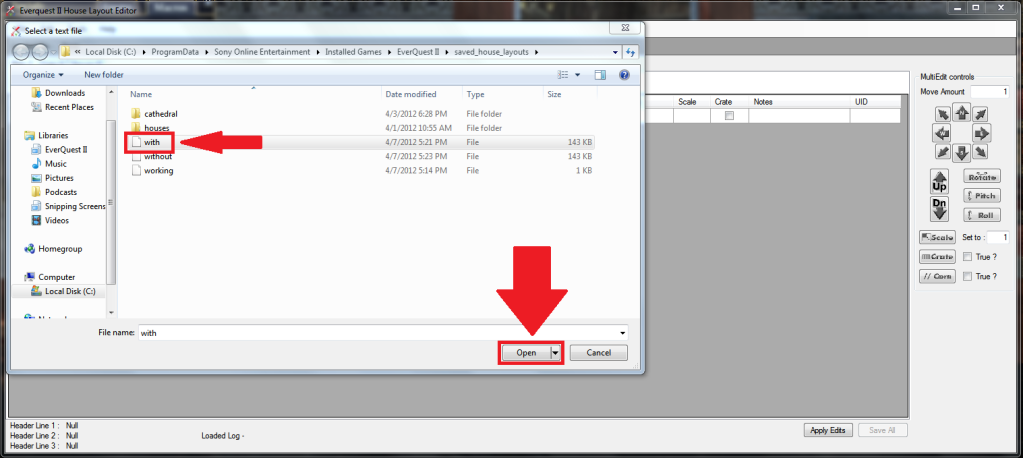
Now go to the layout editor. Go to File, and Open the with layout.


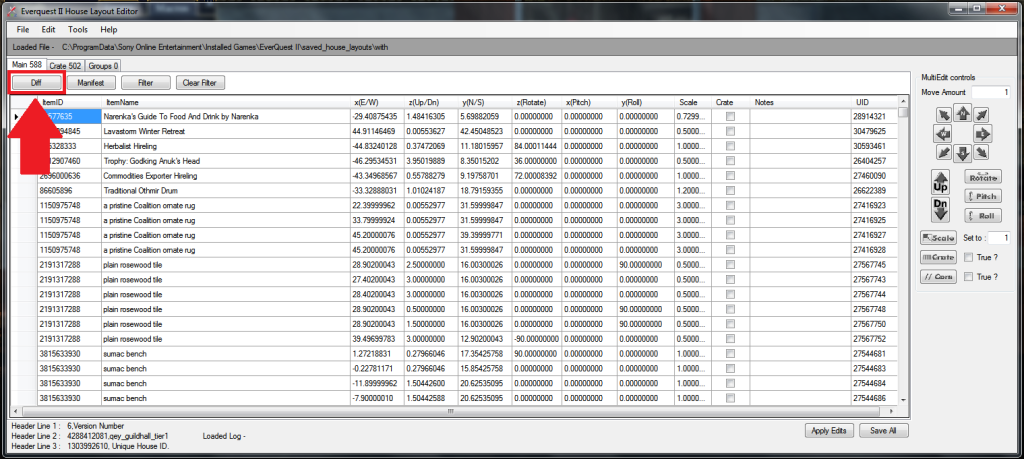
 You should now be on the Main tab. Click the Diff button.


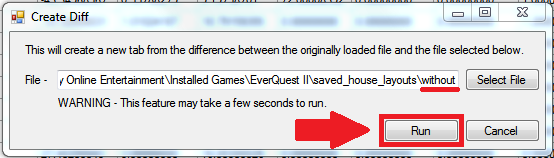
If you've followed the Diff button tutorial or used the Diff button before, the Diff button window should be filled out already. If it's not, navigate to your without layout file, and click Run.


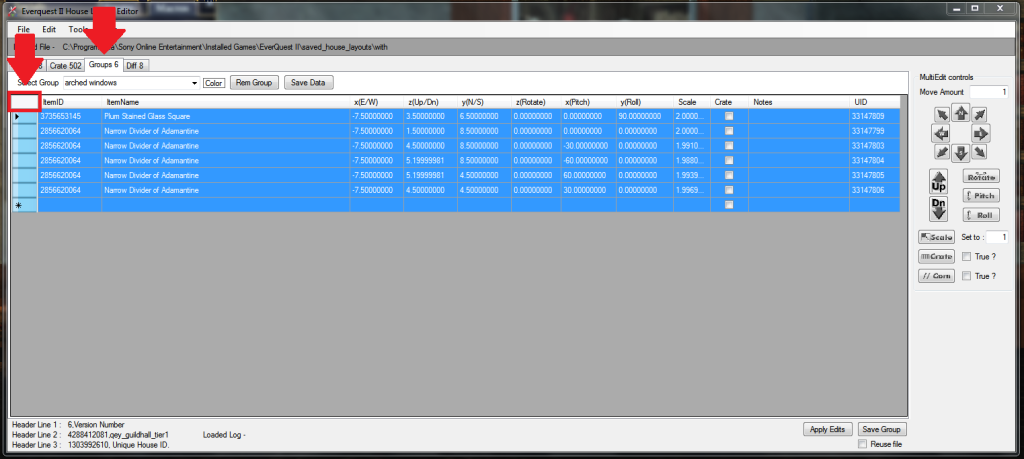
The layout editor should automatically flip you to the Groups tab. You want to select everything you wish to duplicate. It could be a single item, it could be several, or it could be the entire group. In this case, we want to select the entire group. Select everything on the Groups tab the same way you selected everything on the Diff tab. Click the white box to the left of ItemID.


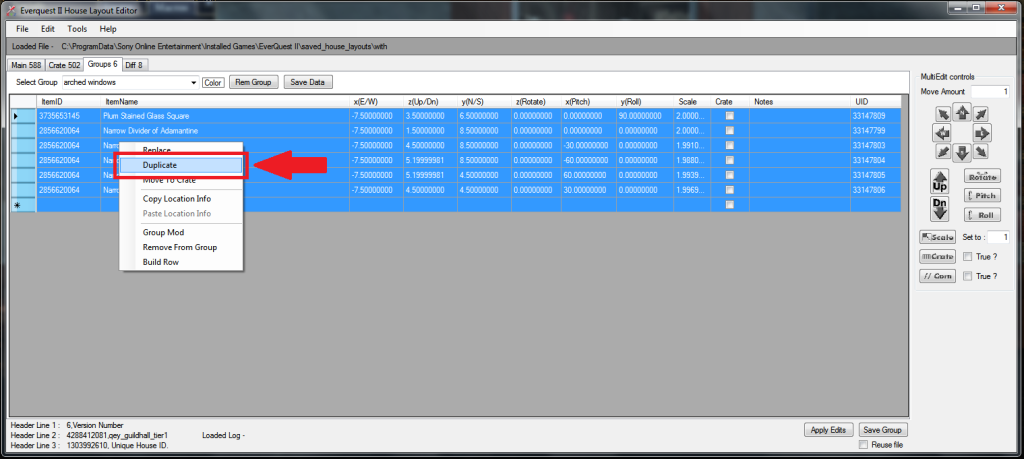
Right click and select Duplicate.


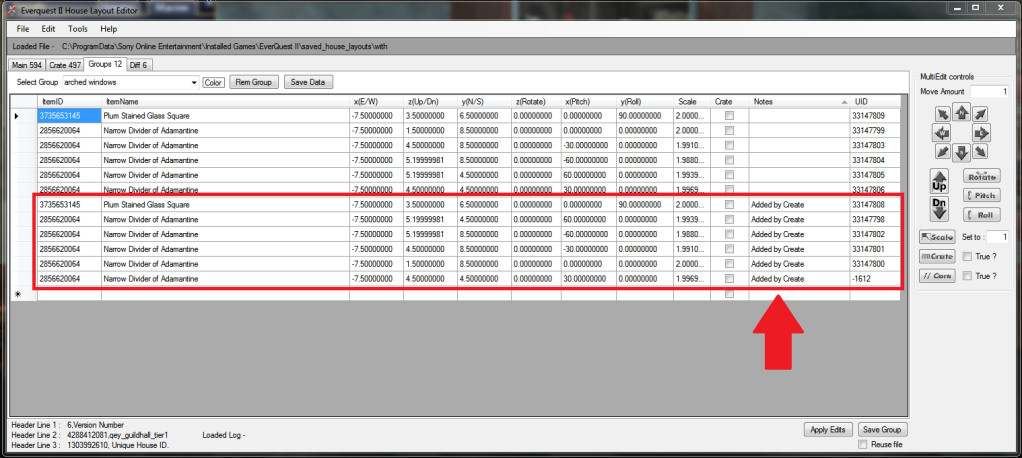
Once you've done that, the layout editor should duplicate everything you had selected. You'll notice that in the Notes column, half the items have "Added by Create" in their note.


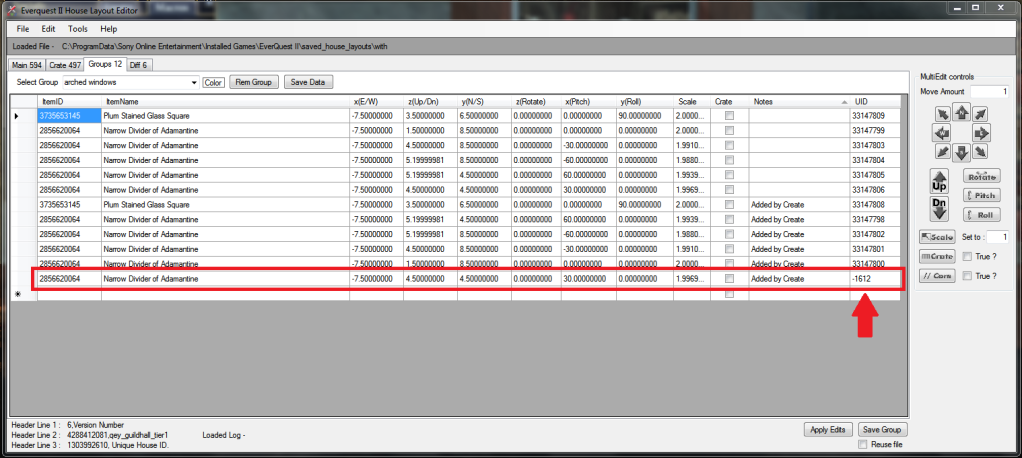
If you look more closely, the very last item has a UID that doesn't look like the others. All other UIDs are large positive numbers. The final Narrow Divider of Adamantine has a four digit negative UID. Negative UIDs are UIDs that are created by the layout editor. If the layout editor creates a UID, it means that there were not enough items in the moving crate. If I had any other Narrow Dividers of Adamantine in the guild hall, when I loaded this layout as it is now, the line with the negative UID would cause the game to steal one of the other Narrow Divider of Adamantine from elsewhere in the hall.


Because I don't want that to happen, I'm going to remove that line from the layout. Part of my window will be missing, but that's fine. This is just a demonstration anyway! (I've already had confused questions asked in guild chat as to why there's part of the cathedral in the guild hall...) First, I select the line with the fake (negative) UID by clicking the blank rectangle to the left of the ItemID column. Then I right click and select Remove From Group.


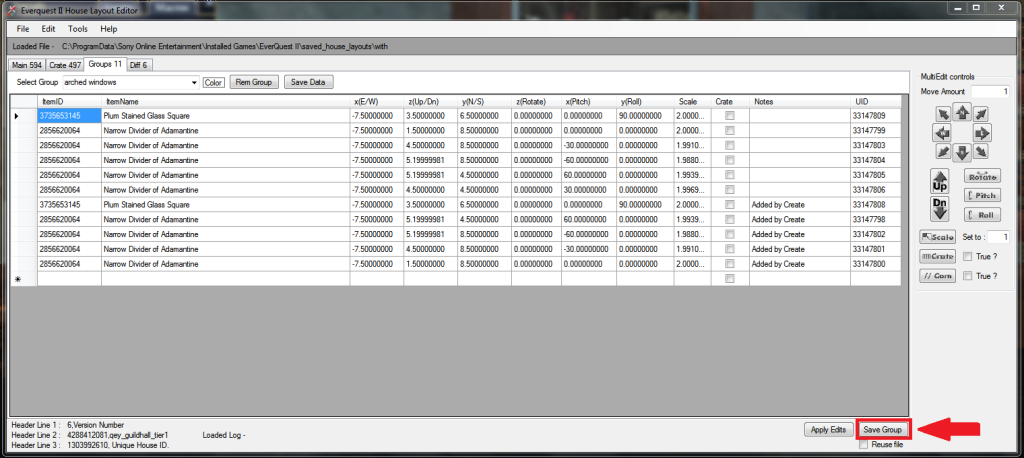
Now the layout is fine, with all of the UIDs positive. So I'll hit Save Group.


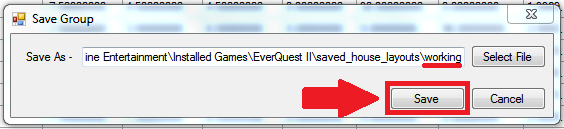
If you've followed the Diff button tutorial, you shouldn't need to fill anything out, just click Save. If you haven't followed the tutorial, you'll need to click Select File and navigate to the working layout file. If you don't have a layout file called working, then you need to go back in game, type /save_layout working, and hit enter. Then navigate to your working layout file in the layout editor's Save Group.


When we go back in game and click the LOAD WORKING macro, we find that not much happened. At least, that's how it appears at first glance. If we look carefully at the window that has reappeared, a little over half of it is much lighter in color than the rest. That's because there are two windows stacked on top of each other. That isn't very useful to us.


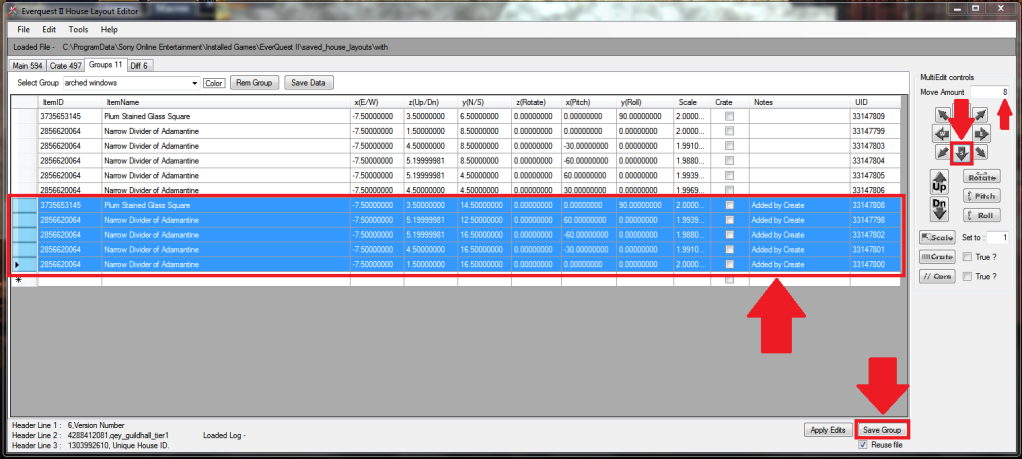
We need to go back into the layout editor. We'll shift the duplicated items until they're beside the original items, forming the next portion of the wall. First, we'll need to select only the duplicated items. Then we'll change the number in the Move Amount box from 1 to 8. Next we'll click the South button once, to move all duplicated items 8 units to the South. Lastly, we'll click Save Group. Because we've saved the group once already, a window does not pop up. In fact, the only way we know it's worked is that the Save Group button winds up having a light blue border, and if we go back in game and load the working layout again, it will have changed.


Now that that's done, we can go back in game and click the LOAD WORKING macro again. Oops! It looks like 8 units was about 4 units too many. (If I'd done math, I could have figured out exactly how many units I needed to move the items. However, for the purpose of this tutorial, having it incorrect just means more examples of how to do things in the editor!)


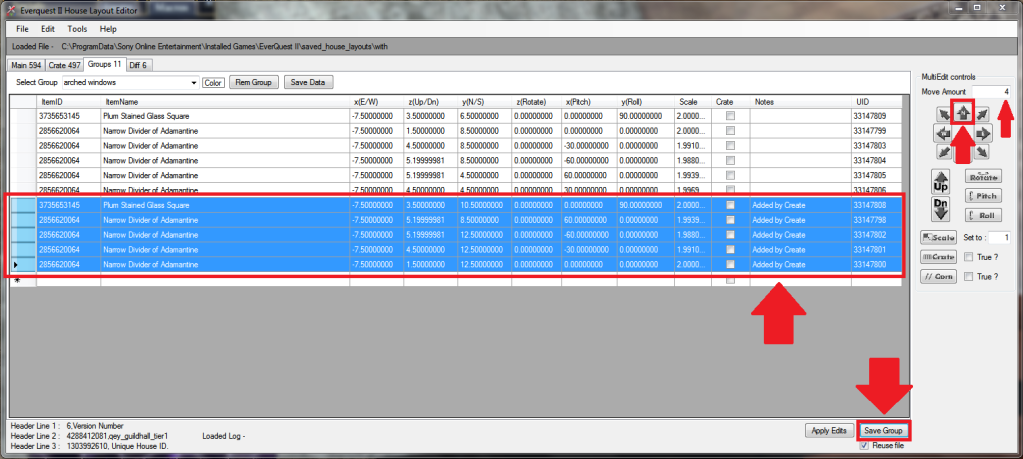
Back to the layout editor to move the duplicated items 4 units to the North. First, we select all of the duplicated items. Then we change the number in the Move Amount box from 8 to 4. Next, we click the North button once. And finally, we click the Save Group button.


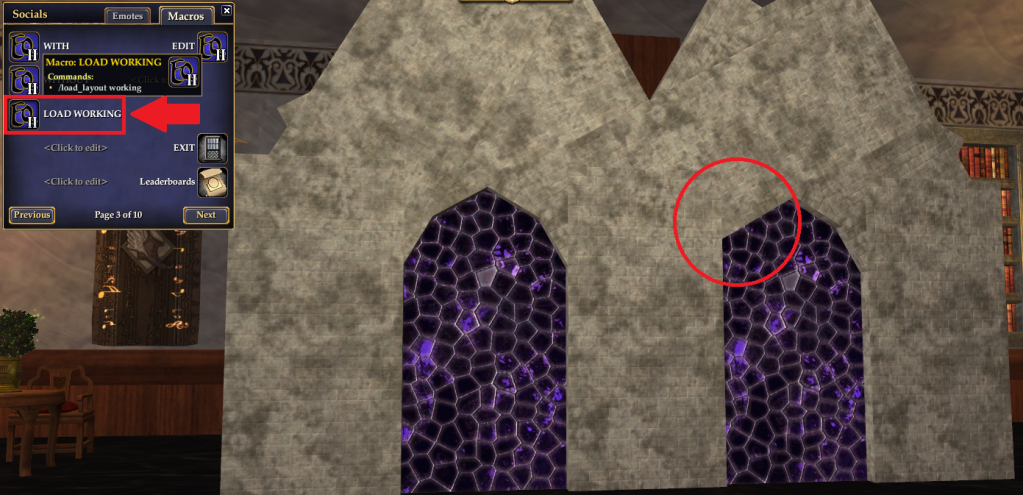
Back in game once more, we click the LOAD WORKING macro again. Yay, everything's where it should be (except for the missing divider that we removed earlier, and whose spot is circled in red.)


Now you know how to use the duplicate function, without it stealing items from random spots in your home! Congratulations!