Saturday, April 7, 2012

How To: Use the Duplicate Feature


(Updated June 23, 2012 for use with layout editor version 1.7.2.14)

This tutorial is for use with version 1.7.2.14 of the layout editor. If you don't have this version, I highly suggest you download it now. Because this tutorial was written before 1.7.2.14, some of the details on the screenshots may be different than the windows you see. However, the important parts of the windows are the same (the parts boxed in red), so I have not updated the screenshots. If that ever changes, I will update the screenshots to match the most current editor.


Another lovely feature of the layout editor is the duplicate feature. With this feature, I can exactly duplicate an item setup, then shift it to a new location, rather than having to rebuild it.

If you haven't read my How To: Use The Diff Button, I would pause and read that now (unless you already know how to use the Diff button. Note that this is the Diff button, not New From Diff. They do similar things, but in a dissimilar way, and we need the features of the Diff button to do this. Even if you do know how to use the Diff button, I would read over the introductory section, where I go over what settings you should have checked).

Imagine, if you will, that I am building a cathedral. I've built a single stained glass window, and I think it's perfect. However, I'm going to need at least 11 more stained glass windows in the exact same configuration, lined up along the wall. Building each one by hand will take a long time. Luckily, Jesdyr has given us the ability to duplicate sections of a layout! So since I don't feel like building 11 more stained glass windows by hand, I'll let the duplicate feature do it for me.

The important thing to remember is that I need to have the correct number of items in the moving crate. If I don't, the game will steal from other items of the same type elsewhere in the house when I load the layout in game. You'll see what I mean later.

Moving on!

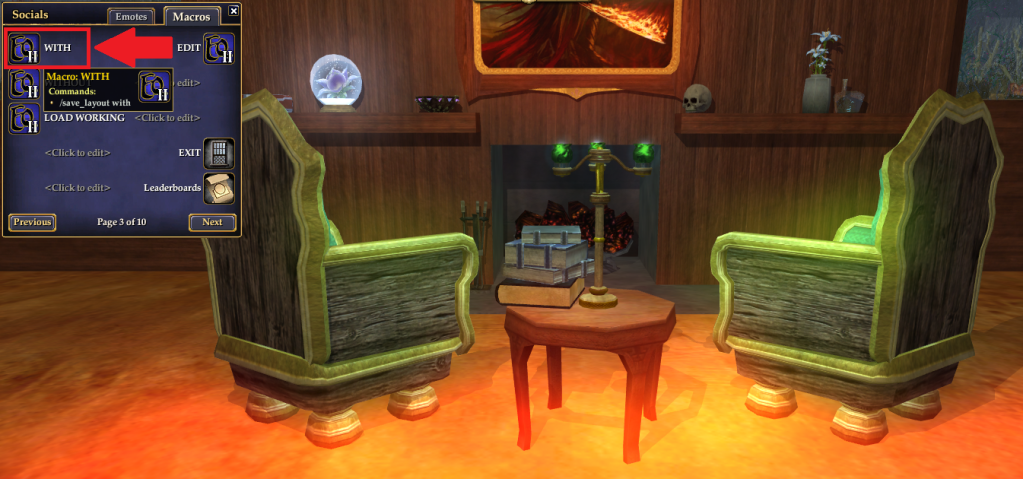
So I'm building a cathedral. I have the perfect stained glass window. I want to duplicate it to create more of them. The first thing I'm going to do is to click my WITH macro.


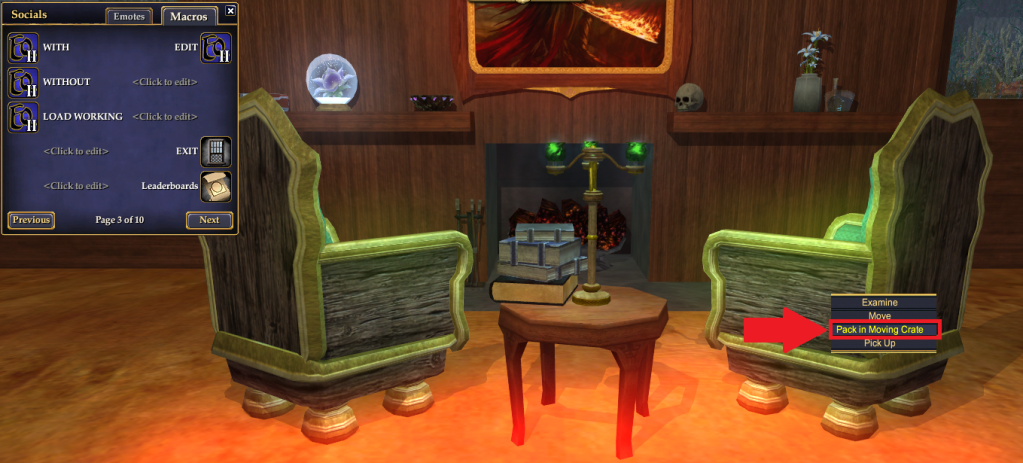
Once I've done that, I can begin packing all of the items I wish to duplicate into the moving crate. Because I want to put my next window directly beside the first, and I'd like them to share the southernmost wall, I'm not going to pack the northernmost wall into the moving crate. I'm going to right click each item I wish to duplicate, and select Pack in Moving Crate.


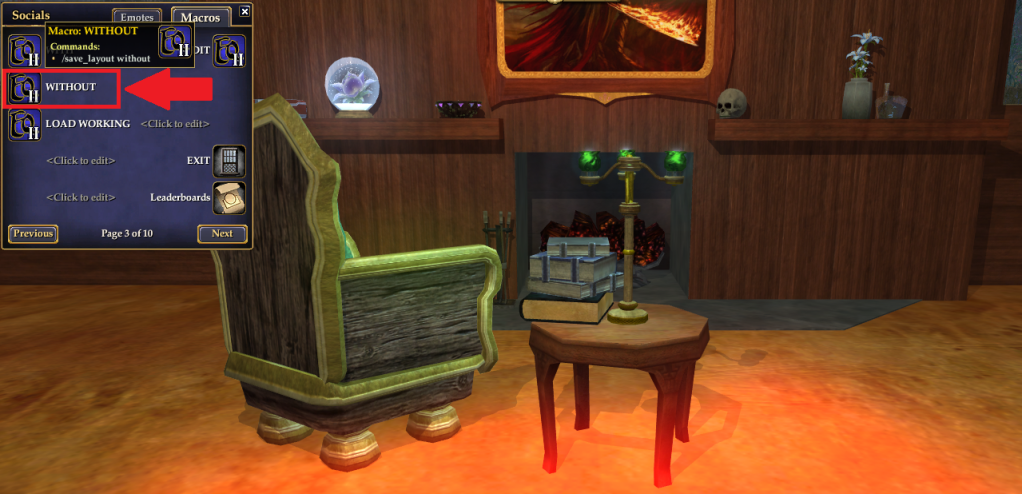
Once I've packed away everything I want to duplicate, I click my WITHOUT macro. It makes sense, right? The house is now without the items you wish to duplicate, whereas before it was with the items.


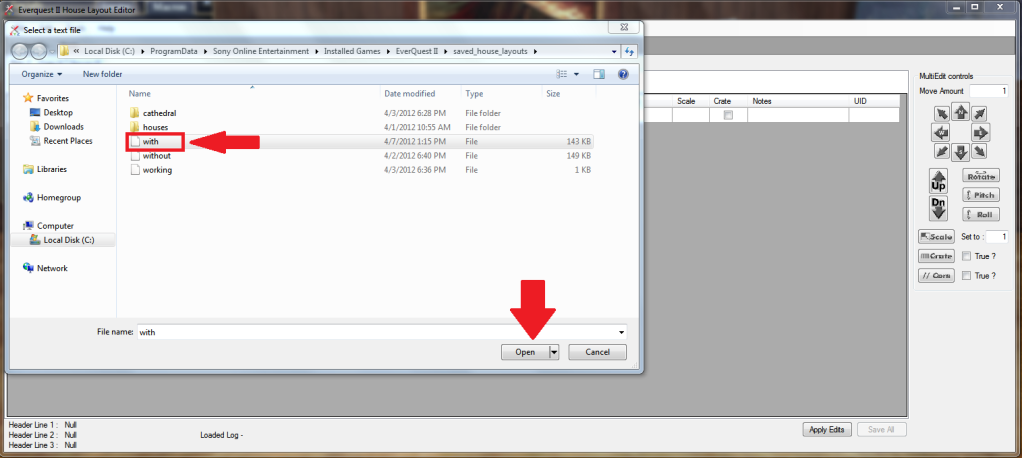
Now go to the layout editor. Go to File, and Open the with layout.
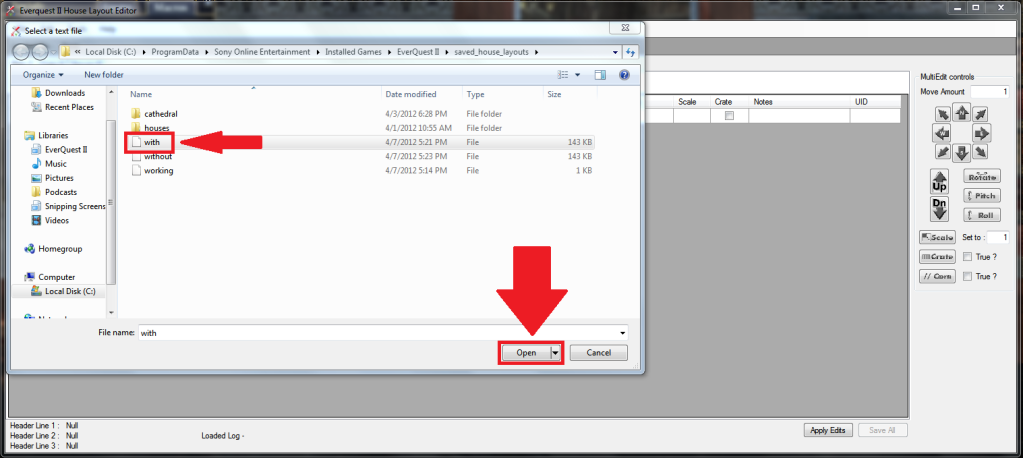


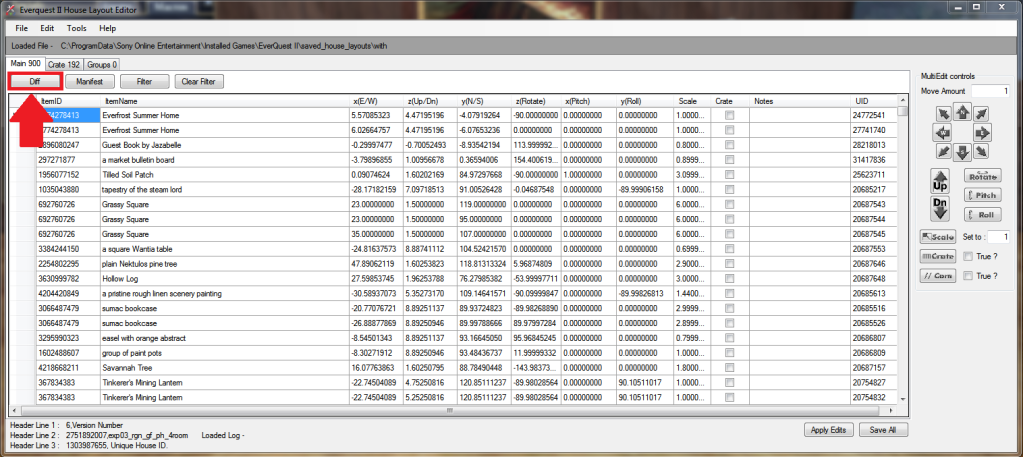
 You should now be on the Main tab. Click the Diff button.
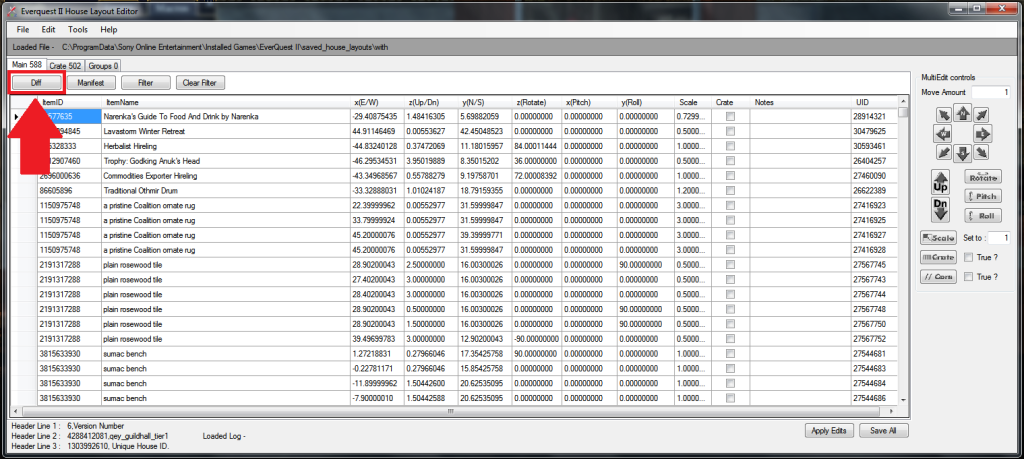


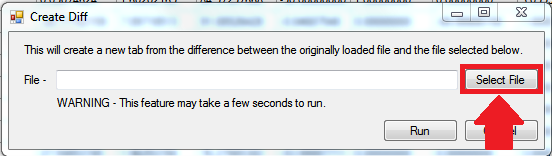
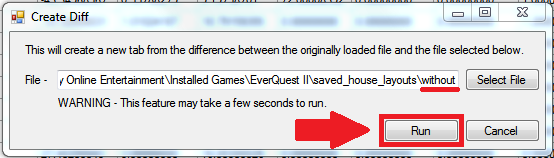
If you've followed the Diff button tutorial or used the Diff button before, the Diff button window should be filled out already. If it's not, navigate to your without layout file, and click Run.


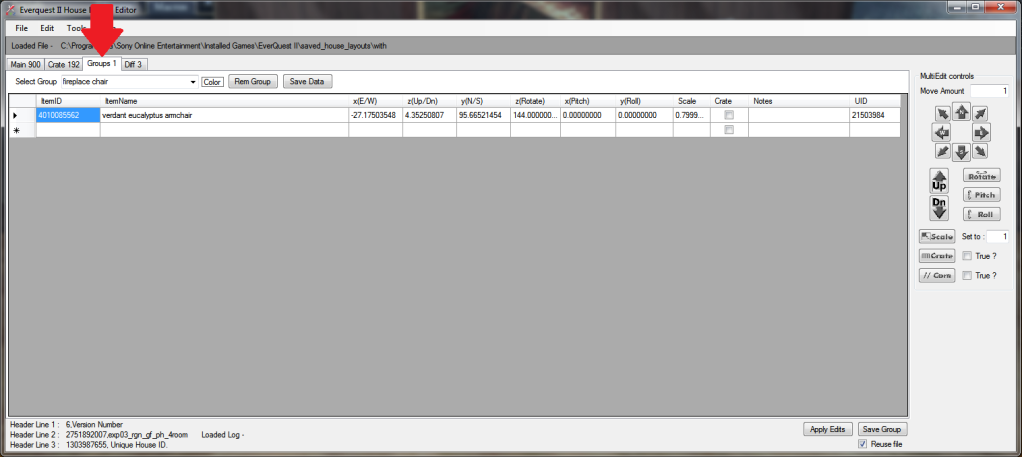
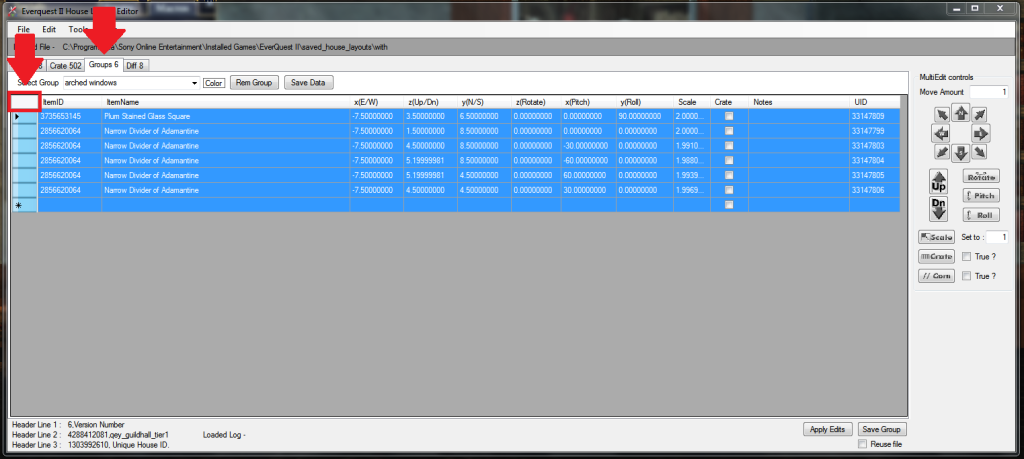
The layout editor should automatically flip you to the Groups tab. You want to select everything you wish to duplicate. It could be a single item, it could be several, or it could be the entire group. In this case, we want to select the entire group. Select everything on the Groups tab the same way you selected everything on the Diff tab. Click the white box to the left of ItemID.


Right click and select Duplicate.
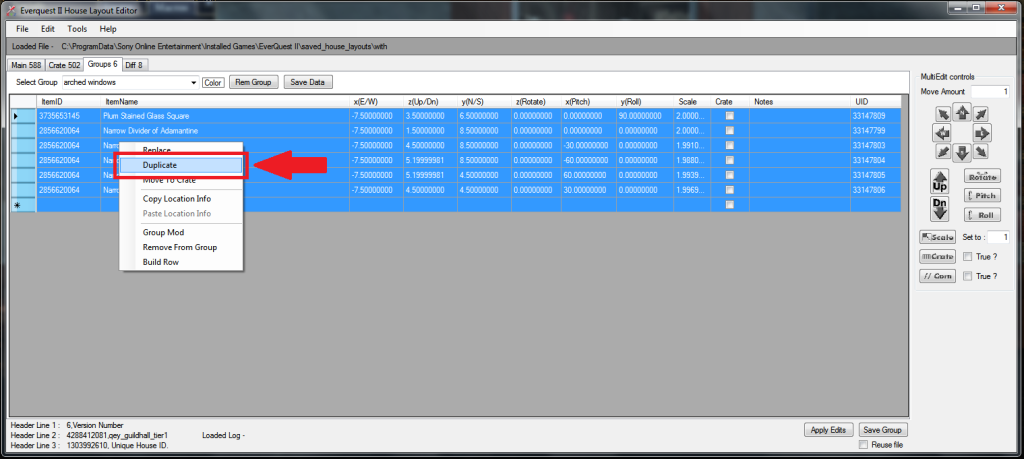


Once you've done that, the layout editor should duplicate everything you had selected. You'll notice that in the Notes column, half the items have "Added by Create" in their note.
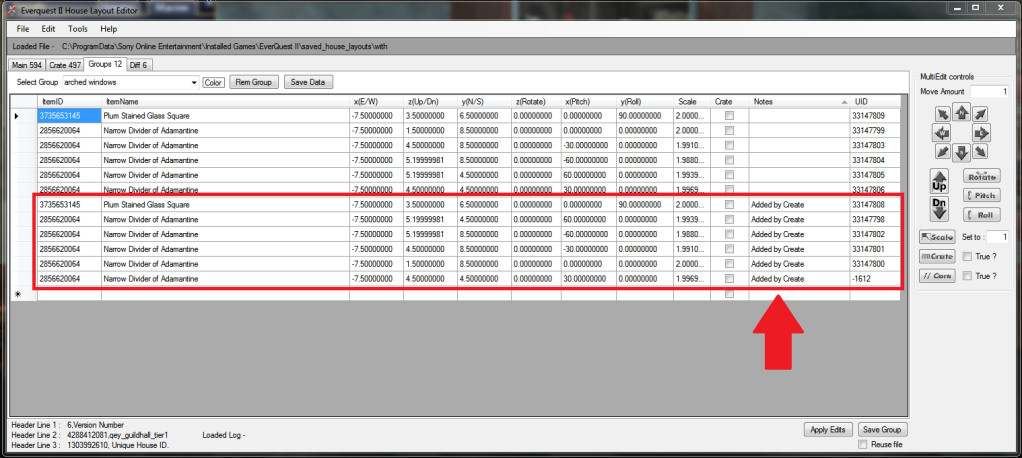


If you look more closely, the very last item has a UID that doesn't look like the others. All other UIDs are large positive numbers. The final Narrow Divider of Adamantine has a four digit negative UID. Negative UIDs are UIDs that are created by the layout editor. If the layout editor creates a UID, it means that there were not enough items in the moving crate. If I had any other Narrow Dividers of Adamantine in the guild hall, when I loaded this layout as it is now, the line with the negative UID would cause the game to steal one of the other Narrow Divider of Adamantine from elsewhere in the hall.
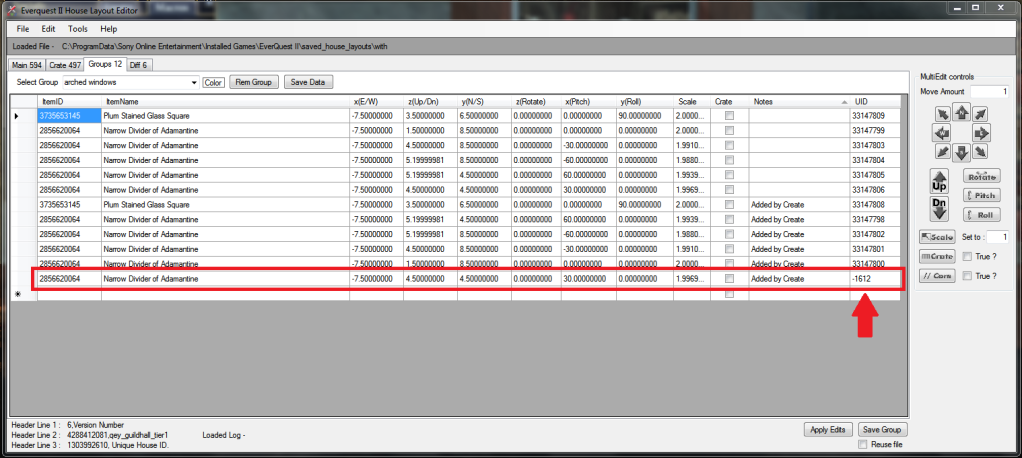


Because I don't want that to happen, I'm going to remove that line from the layout. Part of my window will be missing, but that's fine. This is just a demonstration anyway! (I've already had confused questions asked in guild chat as to why there's part of the cathedral in the guild hall...) First, I select the line with the fake (negative) UID by clicking the blank rectangle to the left of the ItemID column. Then I right click and select Remove From Group.


Now the layout is fine, with all of the UIDs positive. So I'll hit Save Group.
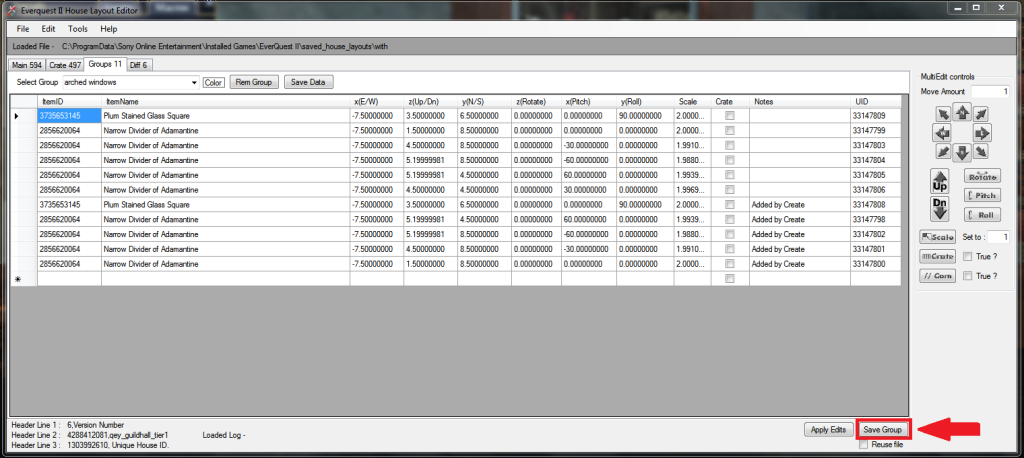


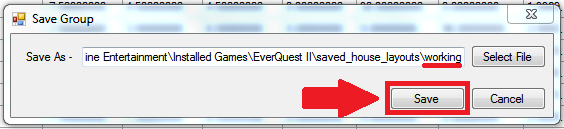
If you've followed the Diff button tutorial, you shouldn't need to fill anything out, just click Save. If you haven't followed the tutorial, you'll need to click Select File and navigate to the working layout file. If you don't have a layout file called working, then you need to go back in game, type /save_layout working, and hit enter. Then navigate to your working layout file in the layout editor's Save Group.


When we go back in game and click the LOAD WORKING macro, we find that not much happened. At least, that's how it appears at first glance. If we look carefully at the window that has reappeared, a little over half of it is much lighter in color than the rest. That's because there are two windows stacked on top of each other. That isn't very useful to us.


We need to go back into the layout editor. We'll shift the duplicated items until they're beside the original items, forming the next portion of the wall. First, we'll need to select only the duplicated items. Then we'll change the number in the Move Amount box from 1 to 8. Next we'll click the South button once, to move all duplicated items 8 units to the South. Lastly, we'll click Save Group. Because we've saved the group once already, a window does not pop up. In fact, the only way we know it's worked is that the Save Group button winds up having a light blue border, and if we go back in game and load the working layout again, it will have changed.
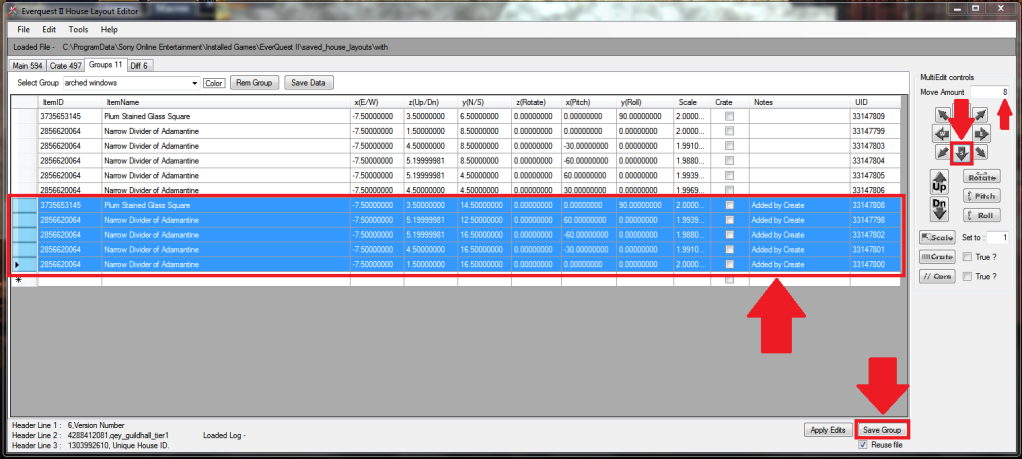


Now that that's done, we can go back in game and click the LOAD WORKING macro again. Oops! It looks like 8 units was about 4 units too many. (If I'd done math, I could have figured out exactly how many units I needed to move the items. However, for the purpose of this tutorial, having it incorrect just means more examples of how to do things in the editor!)


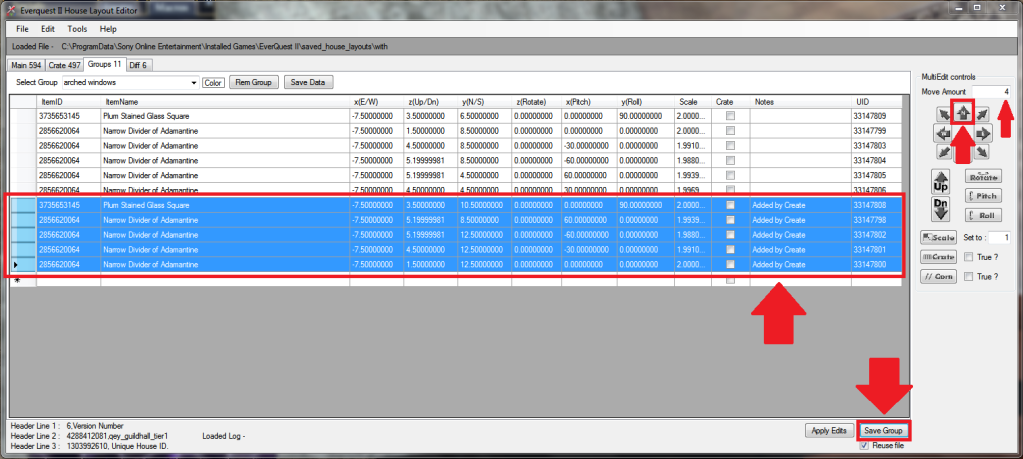
Back to the layout editor to move the duplicated items 4 units to the North. First, we select all of the duplicated items. Then we change the number in the Move Amount box from 8 to 4. Next, we click the North button once. And finally, we click the Save Group button.


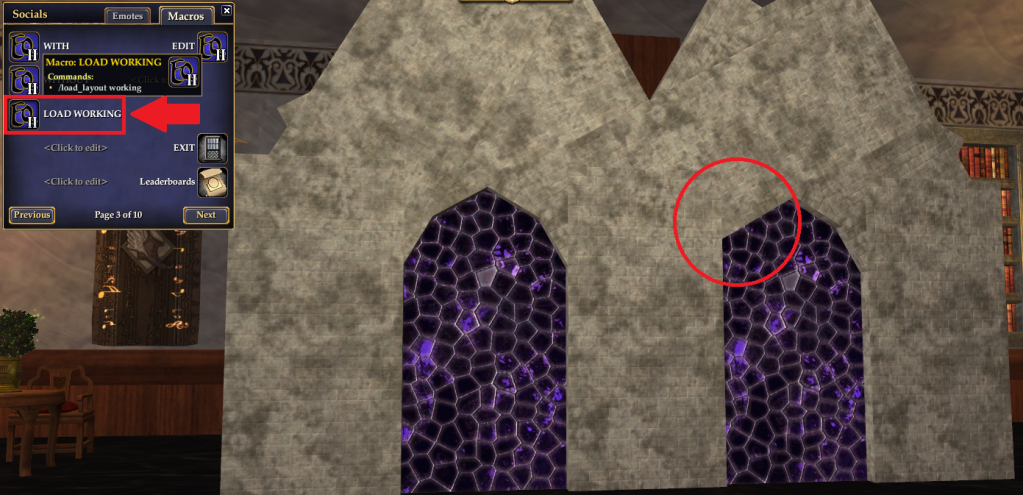
Back in game once more, we click the LOAD WORKING macro again. Yay, everything's where it should be (except for the missing divider that we removed earlier, and whose spot is circled in red.)


Now you know how to use the duplicate function, without it stealing items from random spots in your home! Congratulations!

How To: Use The Diff Button


(Updated June 23, 2012 for use with layout editor version 1.7.2.14)

This tutorial is for use with version 1.7.2.14 of the layout editor. If you don't have this version, I highly suggest you download it now. Because this tutorial was written before 1.7.2.14, some of the details on the screenshots may be different than the windows you see. However, the important parts of the windows are the same (the parts boxed in red), so I have not updated the screenshots. If that ever changes, I will update the screenshots to match the most current editor.


I've had several requests recently for instructions on how to use the Diff button. If you've used New From Diff, it's not too different, but it is different enough to need instructions.

First off, why should you use the Diff button? The Diff button allows you to isolate a single (or several, or many!) items from a layout, without completely removing them from the layout. Confused? Let me explain in more detail.

When you use New From Diff, you basically select the items you want, and delete the rest of the layout. The layout editor can only see the items you're working with from that point on. When you use the Diff button, the other items are still in the layout editor, you're just not working with them.

Think of it this way. You have a book. You only want to read pages 20-35. You rip out pages 20-35. Both the New From Diff and Diff buttons do this. However, with New From Diff, you burn the rest of the book. Bye bye book! Now you only have pages 20-35. With the Diff button, you rip out the pages you want, but you leave the rest of the book sitting nearby. So if you decide that you really need to add page 19 to your pile, you can rip out page 19 and add it to pages 20-35. Much more useful than burning the book, right?

With the horrifying thought of mutilating and burning books in mind, let's move on to how you use the Diff button.

First off, I'm going to assume you know how to locate layout files on your computer. We're going to skip right past finding layout files and straight on to using them.

I like to use three macros to decorate with-- "with," "without," and "working." You can call them whatever you want, but I'll be using those names.

In-game, type /save_layout working, then hit enter. This is a "prep step" that you'll never have to do again.


A few more steps you'll never have to do again:

Create a macro called WITH. Open your macro window (Hit the "o" key by default). Click an empty macro spot. The macro creation window will pop open. Name the macro WITH. Click the Add Step button. In the Command box that appears, type /save_layout with


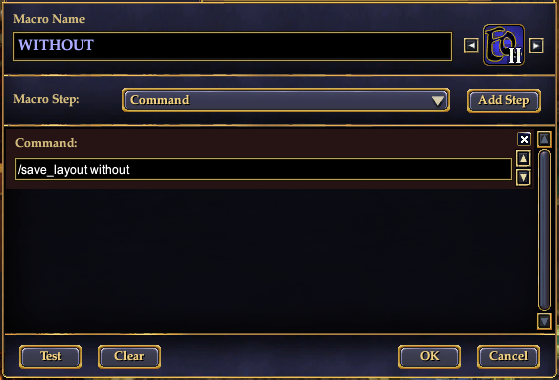
Create a macro called WITHOUT. Click an empty macro spot. The macro creation window will pop open. Name the macro WITHOUT. Click the Add Step button. In the Command box that appears, type /save_layout without 


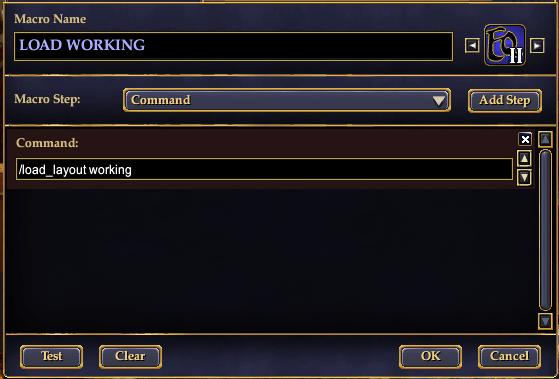
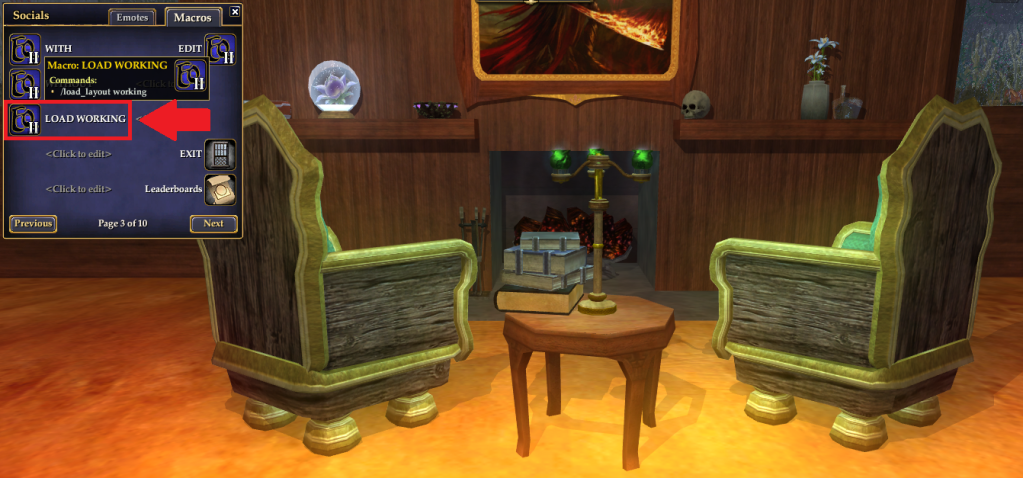
Create a macro called LOAD WORKING. Click an empty macro spot. The macro creation window will pop open. Name the macro LOAD WORKING. Click the Add Step button. In the Command box that appears, type /load_layout working


    The following two prep steps won't be used in this "How To." However, they will be useful in future "How To" entries, or future use of the layout editor.

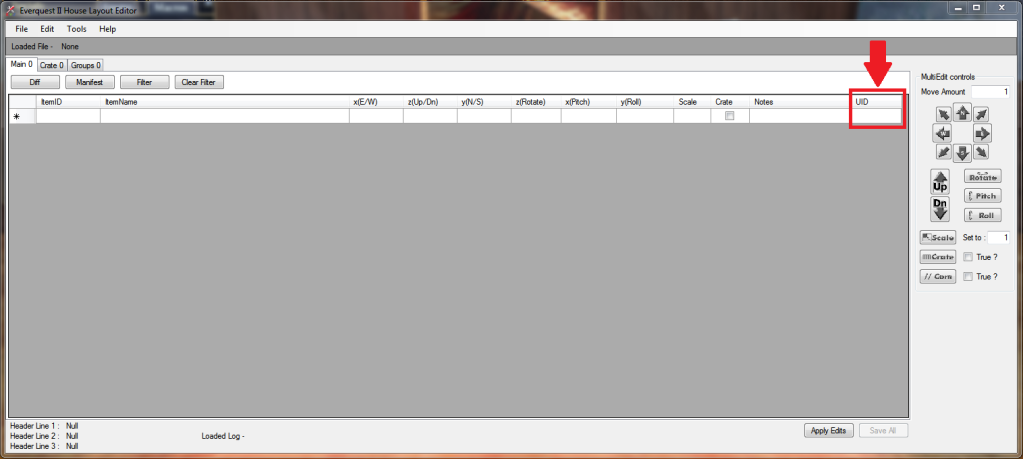
    Switch to the layout editor. Make sure that the UID column on the layout editor is visible. If it isn't, grab the righthand edge of the layout editor window and drag it to the right until the column is visible.


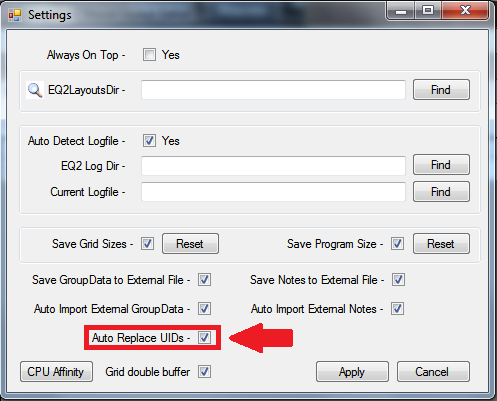
    Click File -> Settings. Ensure that Auto Replace UIDs is checked. It may also be a good idea to ensure that Save Program Size is checked.


    Now, on to the real instructions!

    First, you want to find the item in your house you wish to isolate. In this case, we're going to use one of the verdant eucalyptus chairs. While that item is out in the house, click the WITH macro.

    Right click your chosen item(s) and select Pack in Moving Crate. At this point, you can pack a single item, a few items, or many items. Whatever items you pack will show up in the layout file.


    Once the item (or items) is in the moving crate, click your WITHOUT macro.


    In the layout editor, click File -> Open. Select the with layout file, and click the Open button.


    You should now be on the Main tab. Beside Main, it should list the number of items in your layout. Beneath that is a button called Diff. Click it.


    A window should pop open. Click Select File.


    Select the without file, and click Open.


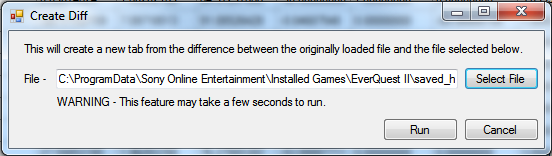
    Once you hit Open, the window should look like this. Keep in mind that if your EQ2 is saved in a different location than mine, the text in your window will be different. The most common locations for EQ2 to be saved are C:\ProgramData\Sony Online Entertainment\Installed Games\Everquest II and C:\Users\Public\Sony Online Entertainment\Installed Games\Everquest II. That does not mean your EQ2 will be in one of those locations, just that those are the two most common locations.


    No matter what, the end text should look like this. Note that the final word is without. Select Run.


    You should now be on the Groups tab. Beside the word Groups there should be a number indicating how many items are in your group.


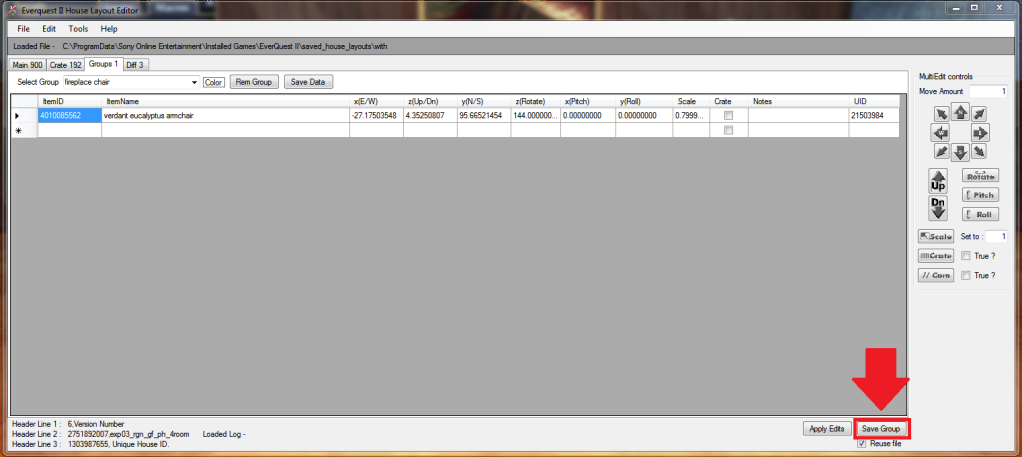
    Now that you have your item in a group, look at the lower right of the layout editor. There is a button that says Save Group. Click it.


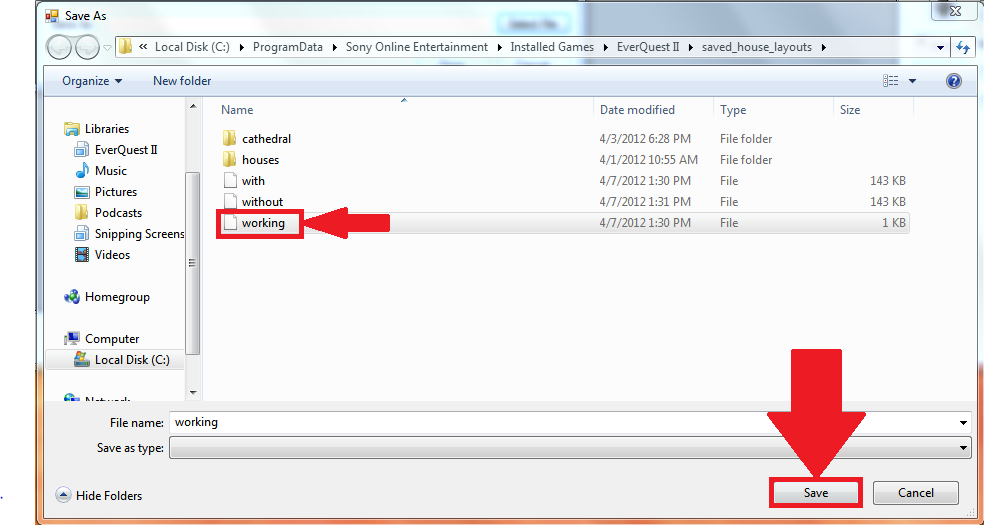
    A window will pop up. Click Select File.


    Select your working file, then click Save.


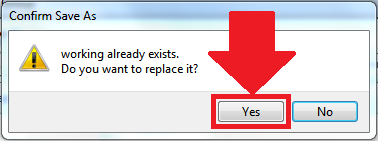
    You will be warned that a file of that name already exists, and asked if you want to replace it. Click Yes.


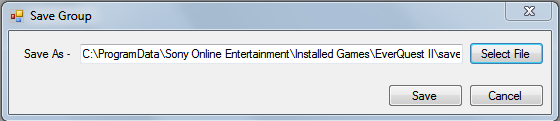
    Now the window should look like this:


    Or like this if you scroll to the end. Note that the last word is working. Click Save.


    Back in game, click your LOAD WORKING macro. Taadaa! Your item has reappeared in game! You officially now know how to use the Diff button to isolate an item (or items) in the layout file!


    Want to see it all in action? Check out the video below to see how this works in-game!


    Friday, March 30, 2012

    Building blocks, building blocks, building blocks oh my! (And a cathedral!)

    Those of you who've been following my Facebook have seen all of these pictures already. However, you haven't heard what I have to say to go along with it! So here it is.

    Approximately one year ago, a character by the name of Dolthaic contacted me. He wanted a temple to Innoruuk constructed. I was reluctant. I am notoriously terrible at commissions. I usually have several going at once, and they always take me longer than expected. Additionally, I had some out of game things going on that made decorating take second, third, or fifth place.

    But then Dolthaic mentioned the magic word. He said, "Gothic." And then he said another magic word. "Pipe organ."

    You don't know this about me, but I adore the Gothic style. I love the intricacy, the arches, the stained glass, the high ceilings. I also adore organs, and pipe organs are a beautiful specimen of the organ family. I started itching for a chance to build a cathedral utilizing these objects, and I'd just been presented with the opportunity!

    It might have seemed more logical for me to turn down the commission and decorate a cathedral for myself, in my own spare time. Fortunately for everyone concerned, multiple housing had just barely come out, and I wasn't used to the idea yet. Plus, what use would I have for a cathedral? So I said yes. I warned him it would take me a while, and that I would probably need to wait a few months before starting it. I needed to get my other commissions out of the way.

    Instead, I started it pretty much that night. I broke out of Neriak, and used floor tiles to figure out the best place to build the cathedral. I checked for load times--I wanted the loading of the cathedral to be instant when you zoned from one teleport pad to the other, which meant that the cathedral had to be in Neriak, close to the original house structure. I also took direction into consideration. When you use a teleport pad, you appear on the new pad facing the same exact direction as you were when you stepped onto the old pad. So the cathedral had to be built with the altar directly across from the teleport pad, for maximum "wow" effect.

    After I'd figured out location and direction, I built a mockup of the first window. It took me a couple of hours to get it right, but eventually I was satisfied. Dolthaic saw it, and was satisfied, too.

    That first window took nine crude stone blocks to build, and looked very rough. But at the time, crude stone blocks were pretty much the only thing we had to work with that would look decent as a stone cathedral. So I churned out a bunch of blocks. Unfortunately, we didn't have crafting AAs at that point. We had a few crafting options for character development, and some crafting gear, but not the AA tree. And crafting the crude stone blocks (which use fletching) as a carpenter (who uses sculpting) was agonizingly slow. Especially since I needed probably a couple hundred of them.

    So I built the west wall of the cathedral. Then I took a break to slowly begin stockpiling the stones I needed while working on other projects. Very slowly. Very very slowly. In fact, it was so slow, that even though I was playing with test ideas in another house, that one wall was all that had been done in Dolthaic's house.

    Then building blocks were announced. Suddenly, it seemed like a good idea to put off entirely. Building blocks would make the cathedral so much easier. Fast forward to March 15th, 2012, when building blocks were unveiled. This was awesome, because we'd originally heard we'd be getting them in June.

    It wasn't until March 26th that I managed to get in-game to craft some blocks and give rebuilding the cathedral windows a go. For the first mockup, the decision that the crude stone blocks looked better was unanimous from people I dragged in to see. Unfortunately, my heart sank at the thought of using the crude blocks, especially since I'd put crafting them on hold at the announcement of building blocks. I was determined to make the building blocks work. So I ripped down the crude stone blocks, and put up the building blocks anyway. Then, just to make sure it looked good, I tossed up a second tier of windows, and created half of the arched ceiling.

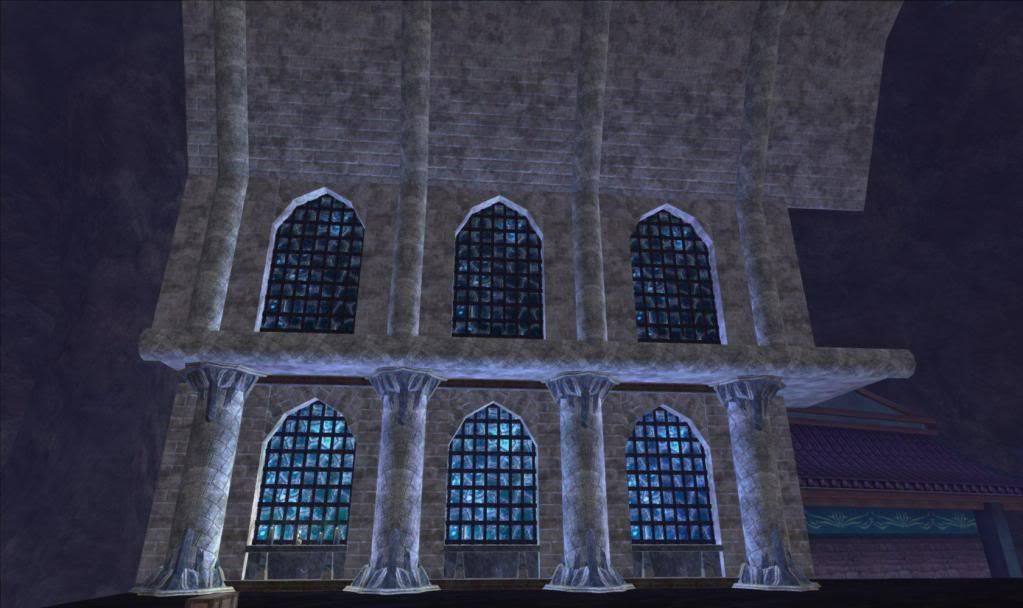
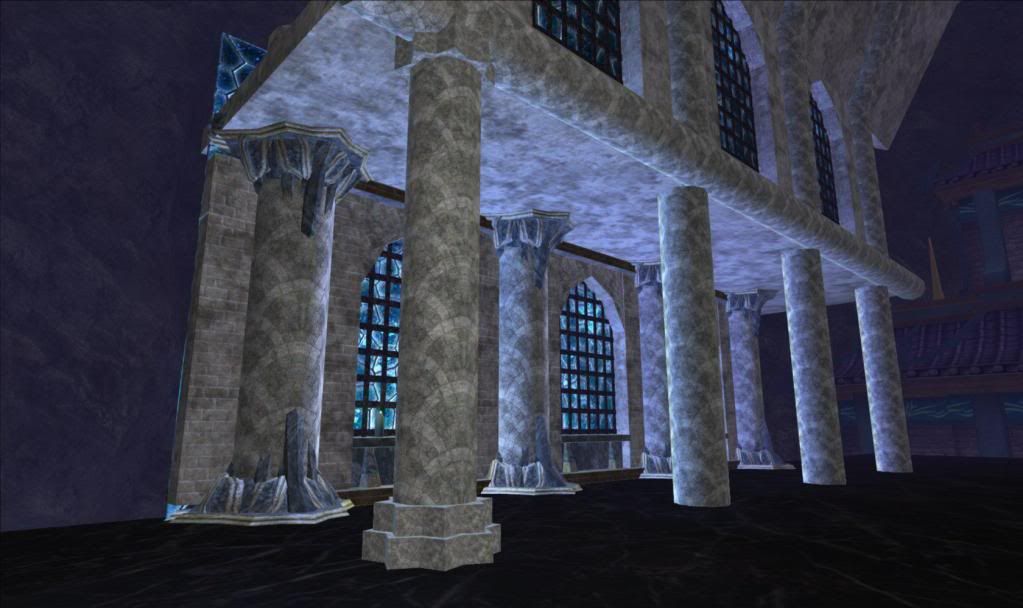
    March 26th, some time in the evening--the first wall and ceiling were completed.
    For those interested, I created this by creating a single panel of the window. Then I used the duplicate feature on Jesdyr's layout editor to copy the arrangement of items. Duplicate pulls items from the moving crate when used properly, so I just had to make sure I had the correct number and type of items in the moving crate.

    Once I'd duplicated the location, I could move the "copied" section to its new spot beside the original section. I duplicated the first window twice, shifting each window the appropriate units North (In this case, each section is 8 units long, so I had to shift each new section 8 units North) so that they lined up in a straight line. Once I'd created the lower wall, I duplicated it and tweaked it a little to make the upper wall. Then I raised the upper wall and shifted it East, so that it hung over the lower wall a bit. Then I added some of the details, like the curved trim between the two tiers.

    After the easy part was done, the hard part happened. I needed to make the vaulted ceiling. That meant either painstaking trial and error to get the angles right as I shifted things into place, or it meant engaging in a little bit of trigonometry. I chose the trigonometry, especially since there's a lovely little website that allows you to input two of whichever combination of numbers you have (and in decorating, you always have at least two of the numbers--the length of one of the sides, and the angle it's at), and it will pop out the rest of the numbers you need. Even better, since it's on the computer, I can just copy-paste the resulting numbers instead of having to type them out. It's a huge time saver over trying to do the trig by hand or Texas Instrument.

    So I guess the hard part wasn't too hard after all. I used the same practice I did with the windows. I built one section, then duplicated it and shifted it North until it was in the correct spot. In less than 10 minutes, I went from having just a wall of two tiers of windows to having a wall of two tiers of windows and half a vaulted roof.

    from http://www.reims-cathedral.culture.fr
    But if you look at pictures of the Reims Cathedral (which is what I've been using for inspiration), the ceiling doesn't just have simple beams going across. It has what are called "ribs." It's more ornate. If this were a real building, it would also be sturdier. Luckily, this is just a game building.

    That meant I had to figure out the calculations to make the columns slant in two directions while lining up at different angles, so that they followed the slant of the roof. I calculated everything perfectly, except that I forgot to take EQ2's mechanics into consideration. I had to use both the "pitch" and the "roll" options to get the columns to do what I wanted, and pitch and roll don't play nice when used together in certain combinations. Just my luck, I was using those combinations! So I scrapped my calculations and did it the good old fashioned "shift this one a tiny bit east. No, shift it back west. Shift it north. There! It's lined up. Waaaaait, no it's not. Shift it just a little to the south. I think I need to shift it down. PHEW finally!"
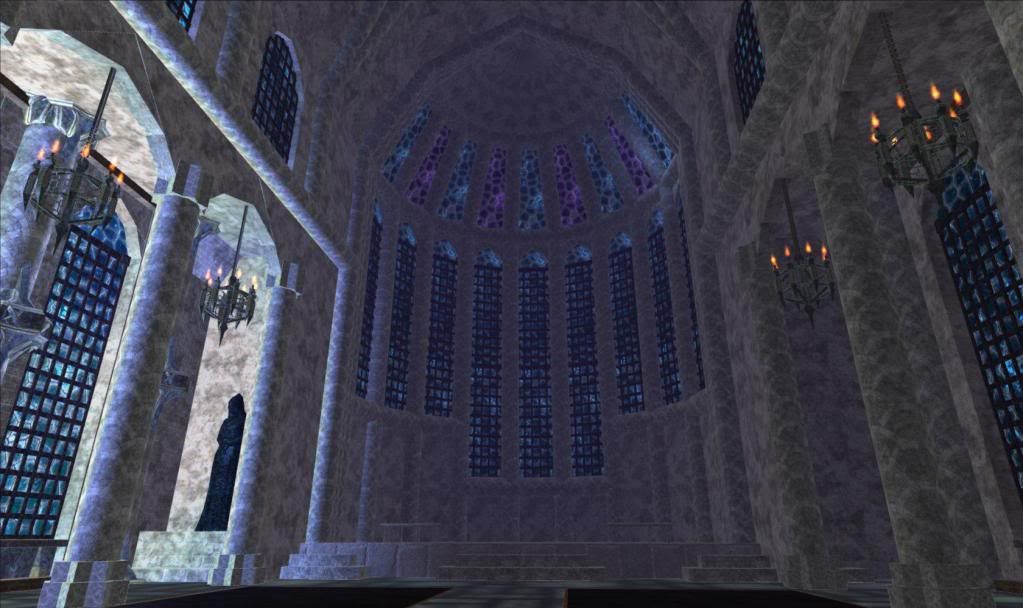
    In the end, it was worth it. It added a lot of detail to the ceiling for a minimal amount of item count, and made it look a bit more realistic.

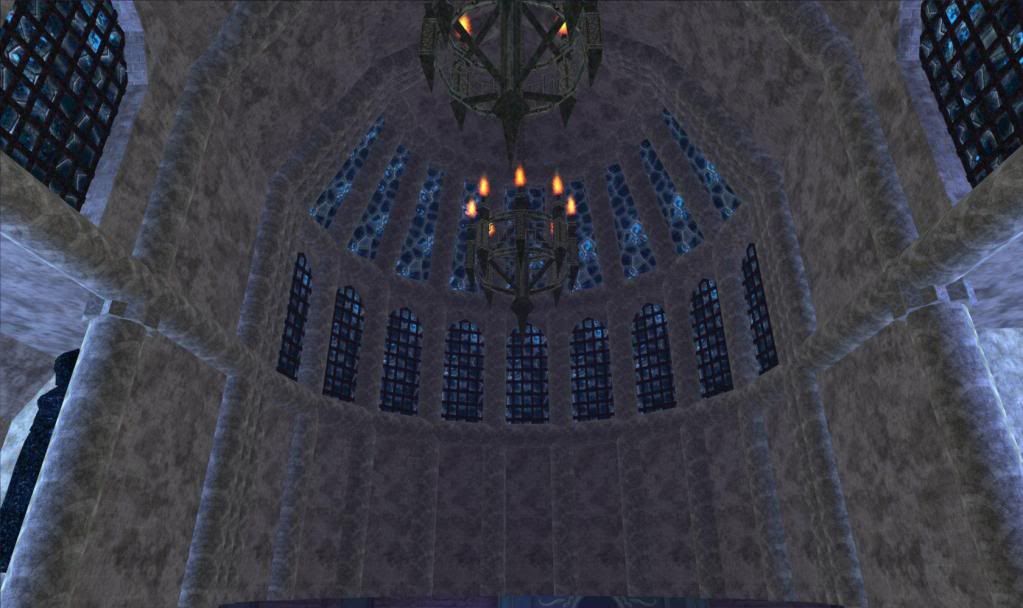
    The ceiling after adding ribs and chandeliers.
    If you look at the screenshot to the left, you'll see that it appears I also managed to build the second half of the roof. That's true! It was very simple. I just put all of the items that created the wall and ceiling together into a layout then duplicated the items. Then I selected the duplicate items, and rotated them 180 degrees around the center point. I had to do a little bit of tweaking, but it took me at most five minutes to go from having a quarter of a cathedral to having half a cathedral (not counting the time it took me to craft the necessary items).

    First test top and bottom of column.
    You can see the plain columns in the background.
    Slowly, ideas and execution come together. I had to tweak the first tier, shifting it out a bit in order to put in the second row of columns. Then I had to figure out what to do for the capitals of the columns, and by extension, the bases.

    Luckily, my first attempt worked out, and I was able to easily duplicate it for the rest of the columns along that side. Then I simply duplicated all of the columns along the east side and rotated the duplicates around the center of the cathedral again, to get the columns into place along the west wall. Duplicate and the group mod option "rotate" are real time savers!

    The original dome.
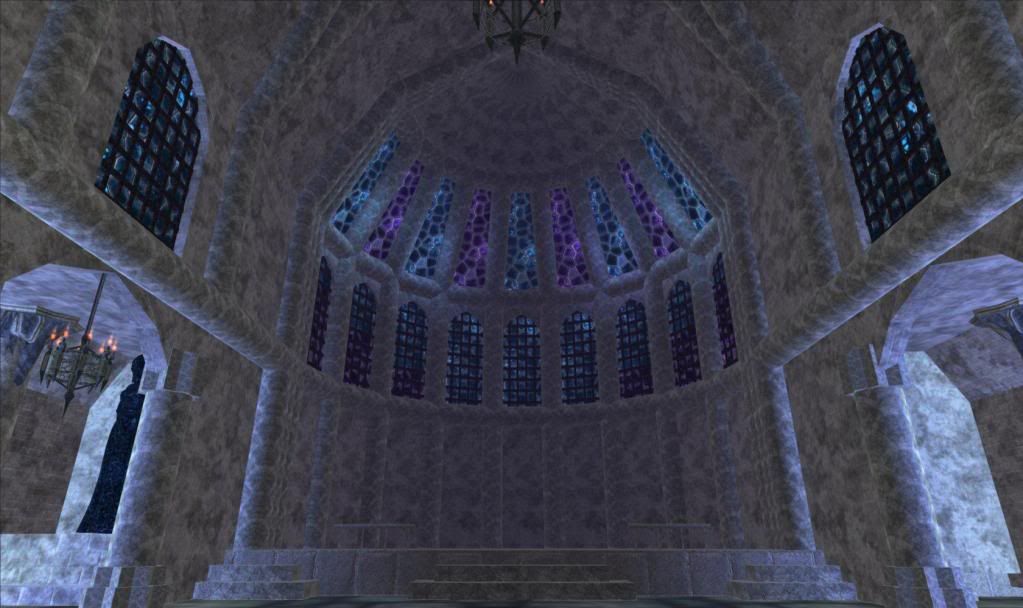
    Once I'd finished the side walls, I decided it was time to work on the front dome. Aside from the (not yet built) pipe organ, it's probably the piece that takes the most items. Better to get it out of the way so I could see how many items I had left to work with.

    The modified dome with alternating glass colors.
    But I wasn't satisfied with the dome. While the blue was fantastic, it felt a little monochromatic. The temple was drowning in blue. So I swapped out some of the blue glass for purple glass.

    That was better, but there was still something off about the dome. I wanted to draw the eye to the altar, and with the huge expanse of grey wall culminating in colorful windows, the eye would be drawn up instead of down.

    BOOM!
    So I figured I could extend the windows down towards the floor, so that the altar would be the first thing to catch your eye. Then the windows could draw it up, much as a real cathedral's window does. I believe I've heard somewhere that the architecture does that on purpose, so that you're looking towards the heavens.

    And that's what a double sized window looks like.
    Before I did that, I decided that the bottom tier of windows was too short. Looking back at the reference shot of the Reims Cathedral, the first tier is very tall. So I used the layout editor to raise practically all of the cathedral 8 units higher. Of course, that involved blowing it up...

    Once that was done, I could extend the walls and windows down until the met the floor again.

    It's now been three days (this is the start of the fourth!), and all that's left to do is to add in the pews, finish the niche in the east wall, put in the organ loft, and build the organ.

    It's almost done! Thank you Jesdyr, for your lovely layout editor. This couldn't have been done so quickly (minus a year) without you.

    It's a cathedral!
    For anyone interested in visiting, this is at 3 Walk of the Dead in Neriak, under Dolthaic on the Antonia Bayle server. At the moment, the homeowner has it open to the public. Stop on by, but if you do, do a /who. If you see me in the house, send a /tell so you don't scare the daylights out of me when you pop up!

    Friday, March 9, 2012

    RibbitRibbitt's Tenebrous Island Refuge

    A few days ago, a mother posted a heartbreaking plea on the Homeshow forums. Her six year old son has cancer, and after a four year fight, he's been given six to twelve weeks to live. One of the things he loves to do is to run around on his Tenebrous Island Refuge.

    He had asked her to add trees, animals, stairs, and other things to make his island more "exciting." Unfortunately, his mother didn't think she was up to the task of decorating the island. Not if she wanted to continue to give him the quality care he deserves in his last months. So she turned to the decorating community.

    The outpouring of support she received is staggering. She has admitted that she only hoped for one or two people to help her put together a little something for him. Instead, what she got was hundreds, across all servers. In fact, people are transferring their characters from their own servers to Guk (where the little boy and his family play) in order to help out. I've heard that SoE has even granted a few people exceptions, allowing them to pay for a character transfer when normally they would not be eligible.

    Kaeylee's jungle gym. We adjusted the "ladders" for easy climbing.
    When I first read the thread, I thought I would simply extend my sympathies. The family wasn't on my own server, and I didn't have the station cash to transfer anything over. Not to mention nothing I had to offer was unique. Then, rereading the thread, I thought of a playground someone on Antonia Bayle had done. I decided to try contacting her, to find out whether she had read the thread. I still don't know whether Kaeylee had read the thread or not before I mentioned it to her, but she jumped on board, willing to offer her layout.

    Streppoch adding some lanterns to jazz up Kaeylee's treehouse.
    I asked her to provide a manifest, then set about finding the carpenters on Guk who'd offered their services. The ones who'd spoken up in the thread weren't around, but before I'd been on Guk very long, I had offers from a husband and wife carpenter team. Between those two and others, the manifest Kaeylee posted was filled within a day.

    At the same time as the carpenters were working on filling Kaeylee's manifest, Afista was working on building a treehouse. When she finished, she posted the manifest in the thread, and had me come to Crushbone to get the layout. With the layout in hand, I waited for Kaeylee's playground to be finished. Once it was done, I loaded Afista's treehouse, then adjusted the positioning so that Kaeylee's treehouse and Afista's treehouse weren't overlapping.

    Kaeylee's carousel on the left, Afista's treehouse on the right.

    Tonight, I asked Twinklin to take Kaeylee's railroad track and turn it into a roller coaster. She did an excellent job (I know, because I keep seeing people running along the track).

    Twinklin's roller coaster over Kaeylee's pond.

    grlnxtdr30 has been working on a giant fish tank, and someone else will be building a candy and ice cream bar. Not pictured are the swimming pond, climbing wall, hopscotch court, play castle, center shrine, and a myriad of different decorations. People have been coming in and adding their own touches throughout. At this point, I wouldn't be surprised to find out a good 40 or 50 people have added their touches to the island.

    People have been flooding the family with gifts of SC plushies and furniture. Others who cannot gift are instead making alts on Guk and purchasing the SC items themselves, then dropping them into the house.

    But the EQ2 community didn't stop with the house and the gifts. The people on Guk decided that RibbitRibbitt should have a tier 3 guild hall to play in, too. So they created Lillipad Jungle. Then they recruited raiders and crafters from all over the server to try and level the guild high enough for a T3 guild hall by Saturday. So far, the guild has made it to level 42 in under 48 hours. People are creating crafters to level on crafting writs. They're creating adventurers and powerleveling them, so that they can do adventure writs. And if they're already 90, they're raiding. A few have even transferred over from other servers to join in the adventuring, crafting, and raiding.

    On Saturday, the raiders--and anyone else who wants to--will /duelbet each other to raise money for the upkeep of the hall. While they're doing that, crafters and decorators will be working on decorating the guild hall.

    Not everyone who will be participating in the /duelbetting is from Guk. Some people are transferring their characters to participate. Others will be creating level 1 characters, to allow raiders to one-shot them in order to raise more money. It's been suggested that people also bring any "cute" races they have, to keep young RibbitRibbitt company while all of this is going on.

    It has been both uplifting, humbling, and saddening to be a part of this. It is awesome to see the community come together like this--Zam and EQ2Traders have both posted blurbs about this, generating yet more support from the community. At the same time, it is depressing to realize it is because of a little boy's imminent death that the community has rallied so strongly. I hope that the island, the guild hall, and the support that the family is receiving right now will help to ease their pain just a little when the inevitable time comes for them to say goodbye. Even more than that, I hope that RibbitRibbitt will be a miracle child, and will beat the cancer back.

    I smile as I run through the island, imagining a little boy playing here. I grin, running across the monkey bars on the jungle gym and racing down the slide. For a little boy with cancer, this may very well be as close as he can get to a playground.

    I giggle, racing along the railroad tracks, and can't help but tear up jumping off the top platform of the treehouse. Afista made sure it was nice and tall, because his mother told us he likes to jump off things.

    Somewhere in my own homes, I will be placing a froglok mannequin. I don't yet know what the mannequin will be wearing, because I haven't yet seen RibbitRibbitt with my own eyes. Eventually though, I'll dress it up. Every time I see it, I will remember a little boy, a little boy's family, and the short request from an overwhelmed mother that produced an outpouring of support.

    Saturday, March 3, 2012

    Decorating Haiku

    While chatting in guild the other evening, the subject of floor inlay designs came up. Many decorators use inlays as a low-cost (unless you're Bitsy, making awesome and complex floor designs) way of filling in an empty space. They give a room some pizazz without having to use a rug. I'm just as "guilty" of using floor inlays as other people.
    The floor inlay in Homes and Tomes guild hall.
    But sometimes it feels like people go a little overboard with inlays.

    They put them on the floors. They put them on the walls. They put them on the ceilings. They put them anywhere they think they can get away with it. And while an inlay here and there is pretty, you want it to draw the eye, not completely cover every surface.

    I'm not saying that anyone has done this. It's just how it feels sometimes. But because I'm just as guilty of using inlays as everyone else, I figured it wouldn't hurt to post the tongue-in-cheek haiku a guildmate whipped up during our inlay discussion.

    Squares squares ev'rywhere
    On the floor and on the wall
    Learn to decorate

    (Thanks, Rosaphina! Your haiku skills are awesome!)

    A visual representation is also known as a picture.
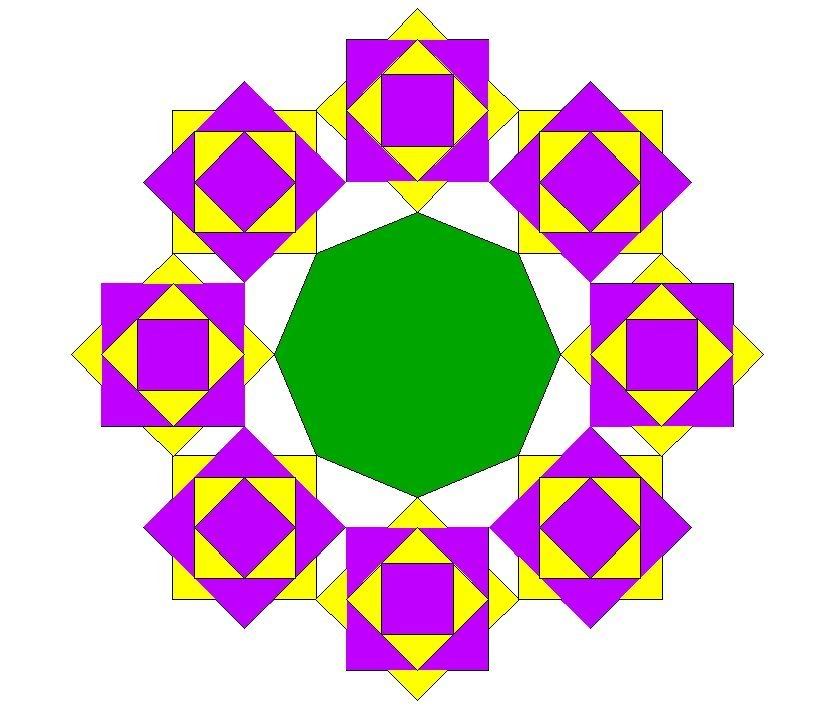
    Then Elogrim upped the ante. In a fit of silliness, he whipped up a visual representation in AutoCAD.

    The results were blinding and way too ornate for an everyday floor. And while the colors technically should work together in some fashion, they really don't.

    Once we got over our giggles looking at the picture, it was almost a given that I had to jump in in some fashion. I mean, Rosa made a haiku making fun of us. Elogrim did something in AutoCAD to demonstrate When Inlays Go Wild. It's my turn, right?

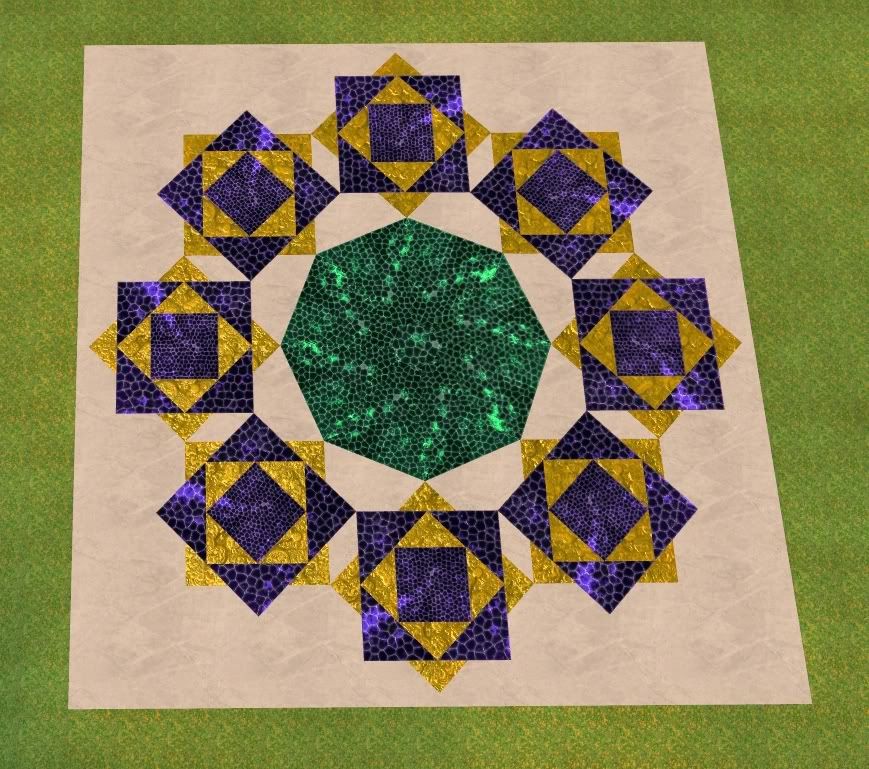
    So I decided that for my trick, being the layout editor crazy person that I am, I would actually build Elogrim's inlay out of stained glass tiles. Technically, I could have built it almost perfectly flat, but I have a teleport pad up so that brave people who either have featherfall or don't mind dying can take a look from up high. Because of the distance however, I had to increase the height between tiles so that there wouldn't be shimmer (well, wouldn't be much shimmer) when seen from the teleport pad. So yes, I know the tiles aren't flush. I know they poke up a bit. But we must all make sacrifices in order to see the design as it is meant to be seen--from above, just like Elogrim's visual representation of Rosa's haiku.
    Yes, this really does exist in-game. I'm so sorry. So, so sorry.
    If you want to visit this horrible monstrosity of an eyesore, please feel free to visit Jazebelle's Tenebrous Island Refuge in Freeport on the Antonia Bayle server. That's Jazebelle, not Jazabelle. Note the difference in the single letter!

    My notes on building the inlay for those interested:


    Diameter of an octagon: s + 2x = d
    Use pythag theorem to figure out x based on s.

    Big purple octagon:
    s = 12
    x = 8.48528137
    d = 28.97056274
    r = 14.48528137

    Radius of circle in layout editor: r + (s/2)
    radius = 20.48528137

    Same radius used for all purple and yellow tiles. Only difference is in the rotation and the scale.

    Yellow tiles rotation is 45.
    Purple tile rotation is 0.

    small yellow tile scale:
    Use pythag theorem to figure out small yellow tile scale.
    scale = 4.242640685

    Small purple tile scale:
    Use pythag theorem to figure out small purple tile scale.
    scale = 3

    To figure out green tile scale, realize that the yellow tiles that create the corners create an isoseles triangle with the top angle at 45.

    Green tile:
    scale = 4.59220119
    s = 2*scale
    s = 9.18440238
    x = 6.4943532

    s + 2x = d

    d = 22.17310878

    r (of design, not octagon) = (d/2) - (scale)
    r = x
    r = 6.4943532

    Start rotation needs to be 22.5 to get it shifted around the circle.

    Sunday, February 26, 2012

    Webcasts and Leaderboards

    I had the pleasure of showing Jaedrian of PUG TV around the Norrathian Research Library, Kelethin Branch. I had contacted him a few days ago, expressing interest in allowing the program to tour some of the homes I've built.

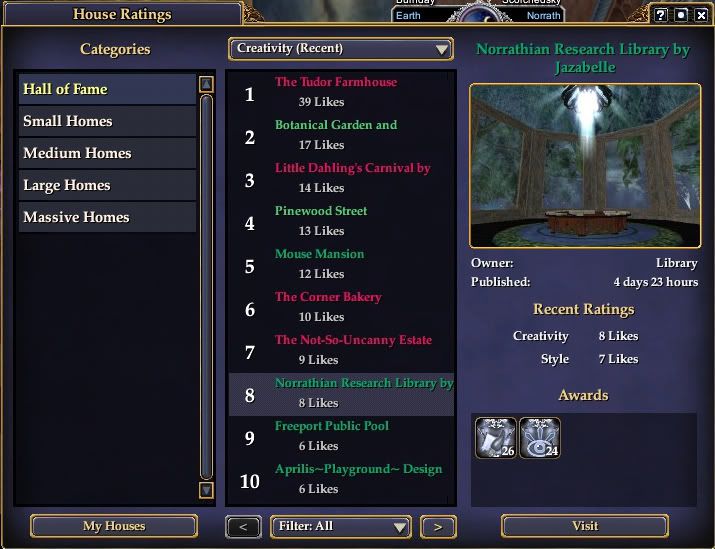
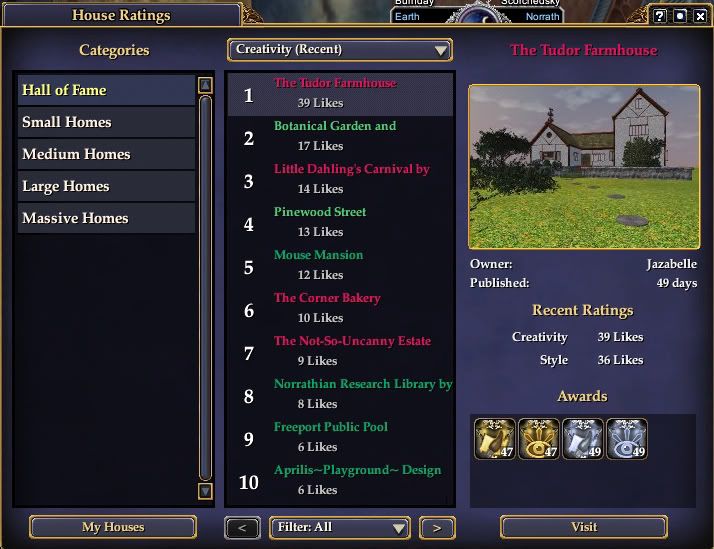
    It took the Library several months to enter the Hall of Fame.
    It was never the top of either category.
    Surprisingly, people have apparently been requesting the Library. Considering how poorly it has done on the Leaderboard, people requesting it on a fledgeling webcast show was unexpected.

    Speaking of the Leaderboard, I still dislike the fact that there are ratings at all. When the Leaderboard was first announced, Zhadowsee and I had a very interesting conversation about decorators and the Leaderboard. We observed that most individuals seemed to be against the idea. He thought that people who managed to overcome their dislike and posted their homes, and whose homes entered the Hall of Fame would change their tune. For the most part, he was right. People's opinions of the Leaderboard seemed to be directly affected by their homes' positions on said boards. It seems rare that people hold fast to their opinions, despite the position of their home on the board.

    Then there's me. When the Leaderboard consisted of a five star voting system, I would not post houses there. No, I lied. I posted the Mazemansion for a Nights of the Dead competition. People used the Leaderboard to easily travel to the Mazemansion. The ratings it received were inconsequential. However, I did not post any houses with the intent of obtaining votes. Several people approached me about posting my houses on the Leaderboard for easy travel. I declined. Once the Leaderboard switched to the "like" system, I became more willing to post homes for exposure and travel, but I still disliked the concept of the Hall of Fame and the Leaderboard in general.

    Amazingly, yes, I still don't like the Leaderboard.
    I now have three homes in the Hall of Fame. One of those homes has been at the top of the Hall of Fame since it was inducted over a month ago. How do I feel about the Leaderboard? I still don't like it. Yes, it's not as hurtful with the "like" system. People aren't running around being half-star bandits, downrating other people's homes so that their own home is pushed up higher on the board. However, it still fosters competition in a previously competition-free environment. I'm not much of one for competition anyway. I don't like competing, and I feel that there are better ways to show off one's skills than to compete against other people. But that's neither here nor there. I've drifted off topic!

    What I was saying before I distracted myself is that the Norrathian Research Library has done poorly on the Leaderboard, leading me to believe not many people were interested in it. Whether this is because word of the Library never spread, so no one visited to "like" it, or people visiting didn't "like" it, I don't know. And that's a good thing--I can't be upset that people didn't "like" it if I don't know whether they visited or not, unlike with the old system. But the Norrathian Research Library was requested more than once for PUG TV.

    I stopped in last night to watch the live webcast of the Norrathian Design Wars. After that webcast ended, Jaedrian contacted me in-game, asking if I'd be willing to do the tour of one of my homes now. Specifically, he asked about the Library. From watching previous webcasts, I figured he would walk around and look at things, talking about what he saw. He would ask me the occasional question, which I would answer. Easy enough, right?

    Wrong! I was told that since I'd seen his webcasts before and sort of knew what to expect, he was going to let me run the show.

    Now, I have a terror of public speaking. It is a terror so bad, I almost lost my lunch every time I had to speak in front of the class in school. And he wanted me to talk! Well, I really couldn't say no at that point, so I decided to give it a go. I'd pretend I was just talking to this guy I was giving a tour to, and I wouldn't think, would not think about the fact that he was broadcasting it live, and people might actually be watching! I didn't entirely manage to convince myself, but I calmed myself down enough that I managed to talk almost normally.

    They're on their second year of dates.
    It didn't help that I was apparently lagging--watching the webcast after he posted it, I noticed that there were long pauses after he finished speaking and before I finished speaking. When I was actually doing the webcast with him, from my end, I spoke as soon as he stopped speaking. There were no long, awkward, first date pauses. Oh well!

    I repeated myself over and over again. I stuttered. I wound up going off on tangents and never answering the questions he posed to me. At one point, I even called Norrath Azeroth! I haven't played World of Warcraft in over two years. Why in the world did I call it Azeroth?! That one still has me baffled.

    And let's not get me started on how much I hate my voice. I detest my voice. Detest. I sound like a little girl choking on a bubble. Ugh!

    There were so many things I wished I'd said in that interview. To begin with, I didn't really talk about the front room as much as I wanted to. It's the only room in the house that is actually inside the house. I built everything else myself.

    The front room was intended to be a hidden valley high up in the cliffs above Kelethin. The idea behind the Library is that it isn't actually in Kelethin, just nearby. When I created the front room, the first month of grottos had just happened. We didn't know if the grottos would ever come back. We didn't know they would occur monthly. We didn't know they would be adding new tiles. I bought a couple of sky tiles, some foliage, and a bunch of grassy tiles for another project. By the time I got to the Library, I'd run out of grassy tiles, which meant some inventive work to cover the walls and floor of the acorn house.

    And stone paving tiles didn't exist! I had to use the layout editor to flip stone hearths onto their fronts to use as the paved road.

    If you look up at the ceiling while standing in front of the Library doors, I tried to use tiles to create an optical illusion of a tower rising into the sky. I didn't really succeed, but I tried.

    I did mention that the valley room of the Library has existed since its first version. The only thing that's changed with it has been the doors. Blazewolf's "Temple of Na'Evrah" had those gorgeous sumac doors. I had to steal them.

    First floor of the Library.
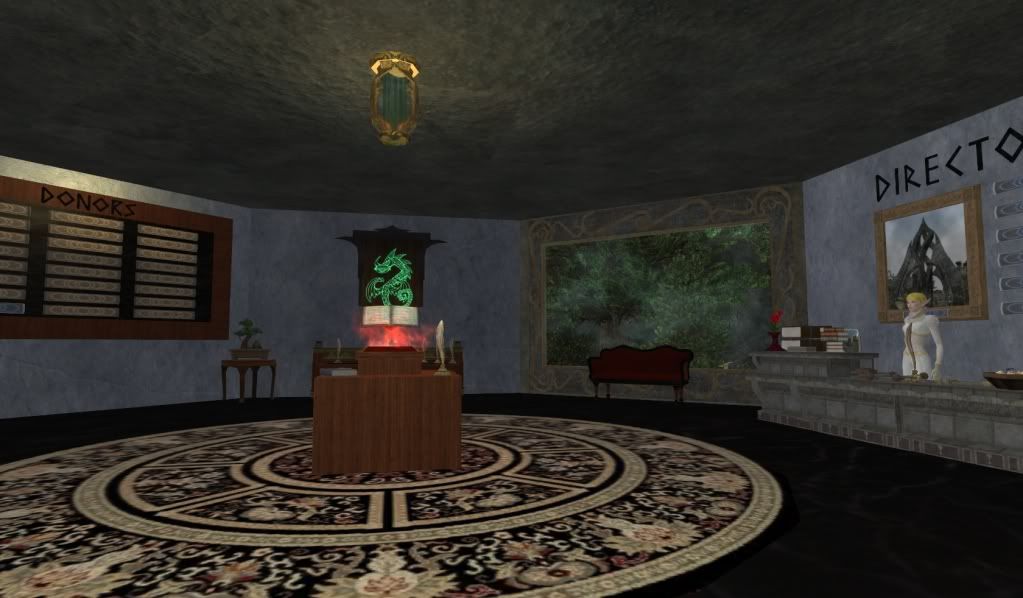
    The counter in the first room of the Library tower is based off of the library where I used to spend my summers as a kid. I loved that counter, because it meant I was about to have a backpack full of books to read all week!

    I didn't mention anything about the display in the center--that's my guestbook! People send me mail, and I update the guestbook with whatever they tell me they want to add to it. Now that they've made it so that you can send a mail from anywhere, I think I'm going to go back to encouraging people to sign the guestbook.

    The Library is something that I envision as a lore source in-game. I'd like for people who need lore ICly to be able to go to the Library and look things up. I'd like for people to be able to hold classes on the 9th floor. I'd like to be able to zone into the Library and find people sitting around, chatting about this or that bit of lore. Will it happen? Probably not. But I can dream!
    If I add seating up here, this'll be a nice place to relax and chat.
    Maybe next time (and there probably will be another Jazabelle Does PUG TV time) I'll actually manage to say what I want to during the tour. We'll see!

    Oh, you wanted to actually watch the tour? Here you go.

    Friday, February 24, 2012

    Where did she go? Oh, there she is!

    The period from October through February is probably the busiest holiday season on Norrath. We have Nights of the Dead followed by the Heroes Festival. Before we catch our breath, we're hit by Frostfell. This year, we had the Goddess Risen world event right up until Erollisi day. Throughout those five months we also have city festivals and grottos each month. It seems like there's never a moment to catch your breath!

    In less than a week, the Neriak city festival starts, and as soon as that's over, Brewday begins.

    I love Everquest 2 and the number of holidays, but sometimes it seems like all there ever are are holidays. So this year I took it easy. I didn't go crazy farming any of the holidays (although my warehouses beg to differ, groaning at the seams with holiday-themed furniture). I took breaks, did things away from the computer, and didn't decorate at all. Because of that, I haven't had much to write about.

    Yet somehow I have a zillion projects I need to finish before mid-March.

    Right now I'm working on cleaning up a temple for Thoradan, building a temple for Dolthaic, arranging mazes for Kiosha, planning boats for Jadirah and Malecht, waiting for Eleanixa to get back to me so I can load the Tudor Farmhouse for her, working on several projects of my own, and planning a dungeon.

    I wonder if I'll ever get back to the cabin in New Halas?